
Style Guidelines
Scale + Proportions
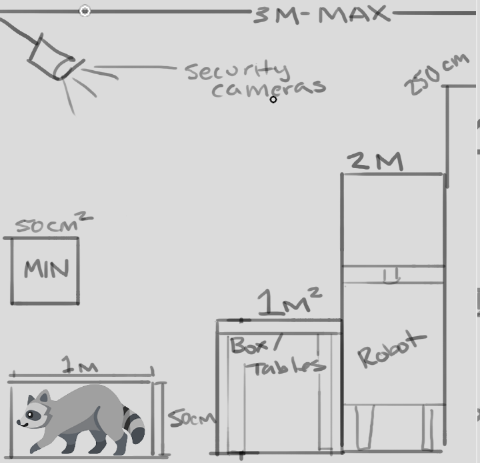
All proportions will be very exaggerated in order for the tiny tanuki to navigate the environment. interactive elements will be placed within 3m of the floor. The main playable character has a size of 100cm x 50cm- all reachable surfaces will be 100cm tall (table tops / switches / crates
Larger characters and elements, like the security robots, should be a max of 2m tall. Security cameras should be placed at 3m above the ground to be visible to the tanuki but out of reach. Non-interactive elements will be a max of 250cm tall to fit within frame
Props that the tanuki can transform into should fit within 50cm-100cm
No props should be smaller than 25cm or larger than 3m
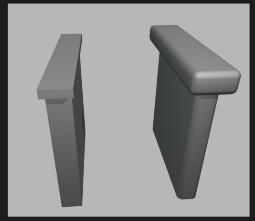
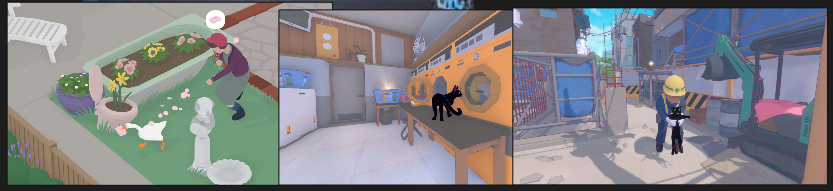
When translating elements to the game style, proportions will be exaggerated for a playful effect. See the example above^ whenever there are areas that can be exaggerated without losing their silhouette, they should be exaggerated. Below is examples of how similar games have pulled off this scale exaggeration- the goose and the duck would be much smaller, but the worlds don't feel "looming" or overly giant around them.
Granularity + Detail
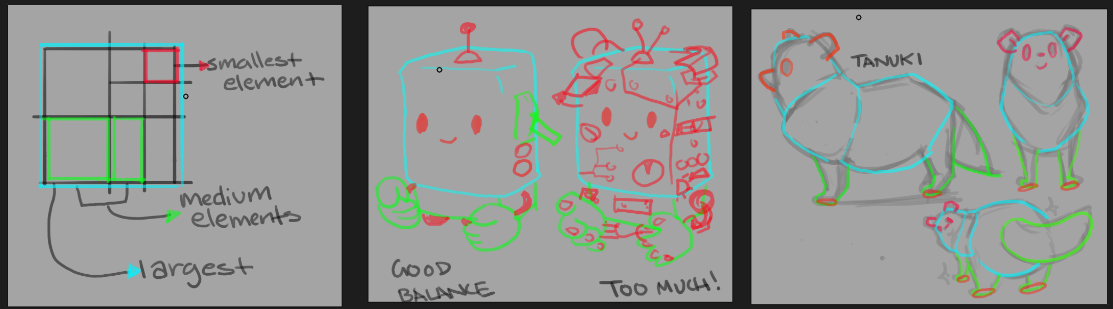
Designs should be sorted into large, medium, and small elements- finding a balance between them. There should be a main form that is the largest element and make up 75% of the object or character's silhouette. Medium elements should be 25%-33% of the size of the largest shape, and take up about 20% of the silhouette. Small elements should only have a very minimal impact on the characters main silhouette, 5%. See the example above, the robot on the left is easy to read at a glance, and still includes cute details - like a few buttons and levers. However the robot on the right is too busy to understand, with too much visual information and the main shape gets lost. For our game, we want to keep a good balance and use small elements that are no smaller than what is pictured above, and used sparingly to tell a story- not to overwhelm the viewer.
This is a very simplified style, so start by seeing what the least visual information is possible to communicate the object or character, and build up from there
Edges + Beveling
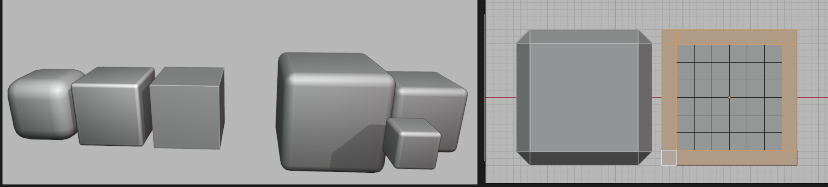
1m = 0.1 bevel distance
2m= 0.2m bevel distance
3m = 0.3m bevel distance
WIP
High Poly Sculpt Pass
WIP
Materials
WIP