
Pulling upstream changes with Git
We are experimenting with following a Git workflow where everyone is allowed to work from and commit directly to the dev branch. This comes with the consequence of having your local version of dev frequently falling behind upstream changes made to origin/dev (the server's version of dev) as youother arepeople workingpush ontheir your local changes.commits. This oftencan leadseasily lead to a pitfall when pulling changes from origin/dev wherebecause contributorsGit enddefaults upto unnecessarilyfast-forward mergingor merge when pulling. This means that by default, if the branches diverge (meaning there are both upstream and local changes) it will create a commit with the subject line origin/devtheir local dev. branch.These Thisextra cluttersmerge commits clutter the repo's historyrepo by creating unnecessary cruft in the commit history andthat makes it difficult to understand the sequence of changes. What actually needs to be donehappen is your local changes need to simplybe rebased on the upstream changes. The instructions below show how to configure Git on your system to default to rebase when pulling.pulling Theso rootit causewill is that Git defaults to fast-forward or merge when pulling. For our use case we need to changedo the defaultright pullthing strategyfor toyou rebase.automatically.
On Windows, you can make this change while installing Git when you get to the prompt in the installer asking "What should `git pull` do by default?". It defaults to Fast-forward or merge. You need to set it to Rebase like this:
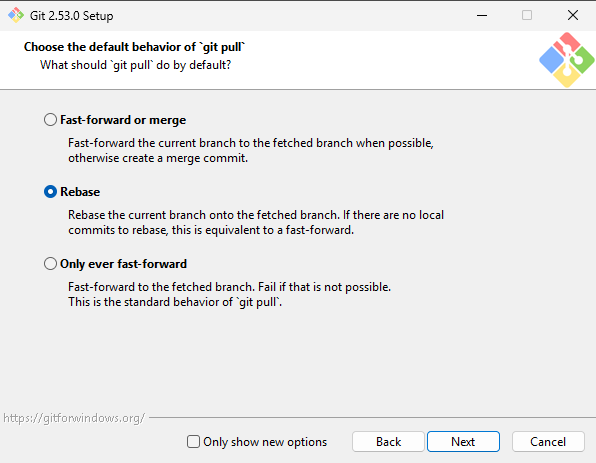
Note: If you did not change the default pull strategy in the installer, you can still change it manually from the command line. See below.
On MacOS / Linux, installing git works differently and does not have an installer like on Windows. However, the default pull strategy is still fast-forward or merge, and needs to be changed to rebase.
On all platforms, in a command prompt / terminal set the pull.rebase option to true with the following command:git config --global pull.rebase true
In SourceGit, with the above Git configuration change, it should default to use the system Git pull strategy configuration. Still, make sure when you are pulling that the checkbox for "Use rebase instead of merge" is checked before pulling.
It should look like this: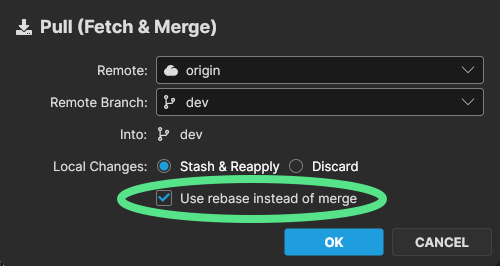
If you still see the origin/dev branch get merged into your local dev branch with a merge commit when you pull, please do not push that extra merge commit to the repo. Reach out to one of the many Git experts on our team for help with correcting the mistake before you push your changes.