Pulling upstream changes with Git
We are experimenting with following a workflow where everyone is allowed to work from and commit directly to the dev branch. This comes with the consequence of having your local version of dev frequently falling behind origin/dev (the server's version of dev) as you are working on your local changes. This often leads to a pitfall when pulling changes from origin/dev where contributors end up unnecessarily merging origin/dev into their local dev branch. This creates confusing cruft in the repo's history that makes it difficult to understand the sequence of changes. What actually needs to be done is to simply rebase. The root cause is that Git defaults to fast-forward or merge when pulling. We need to change the default pull strategy to rebase.
On Windows, you can make this change while installing Git when you get to the prompt in the installer asking "What should `git pull` do by default?". It defaults to Fast-forward or merge. You need to set it to Rebase like this:
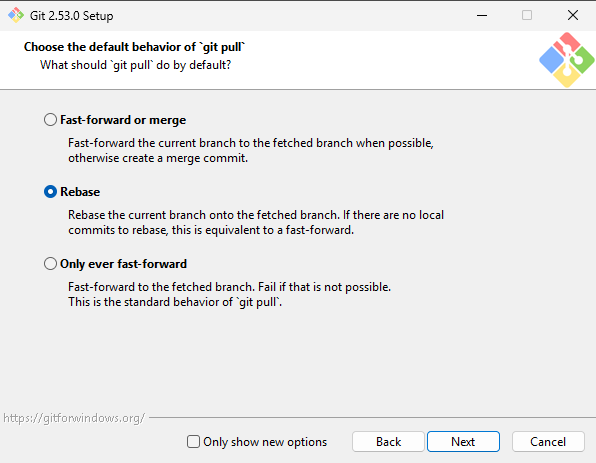
Note: If you did not change the default pull strategy in the installer, you can still change it manually from the command line. See below.
On MacOS / Linux, installing git works differently and does not have an installer like on Windows. However, the default pull strategy is still fast-forward or merge, and still needs to be changed to rebase.
On all platforms, in a command prompt / terminal set the pull.rebase option to true with the following command:git config --global pull.rebase true
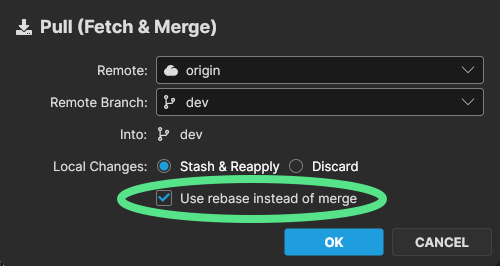
In SourceGit, with the above Git configuration change, it should default to use the Git pull strategy configuration. Still, make sure when you are pulling that the checkbox for "Use rebase instead of merge" is checked before pulling.
It should look like this: