Game Design Document
A snapshot of my old GDD for Chucky and Dexter (warts and all) ported from Google Docs to BookStack
- Chucky & Dexter
- Change Notes
- High Concept
- Milestones
- Art Direction
- Sound Design
- Controls (And Other Scripts)
- User Interface, Title Screen, and Menu
- Level Design
Chucky & Dexter
Chucky & Dexter
Studio: LWTech GAME BAS Cohort #2 (Class of 2020)
PC and Console Game
Built with Unity 2018.3.7f1
Change Notes
01/24/2019
Game concept and pitch were created: This game was originally pitched as a project for the LWTech GAME BAS 2020 Cohort’s 2D Game Design class. The idea is to have a game that our team of 14 students can produce in about 5 weeks. The idea isn’t particularly complicated or unique, but should be achievable in the allotted time.
02/13/2019
Game ideas were pitched to the class, Chucky & Dexter received the majority vote to be the game we work on for the rest of the quarter.
Began converting the game pitch document from concept material into proper Game Design Document that can be used for development.
02/14/2019
All major areas of the GDD were completed, document was shared with team and opened for comments.
02/20/2019
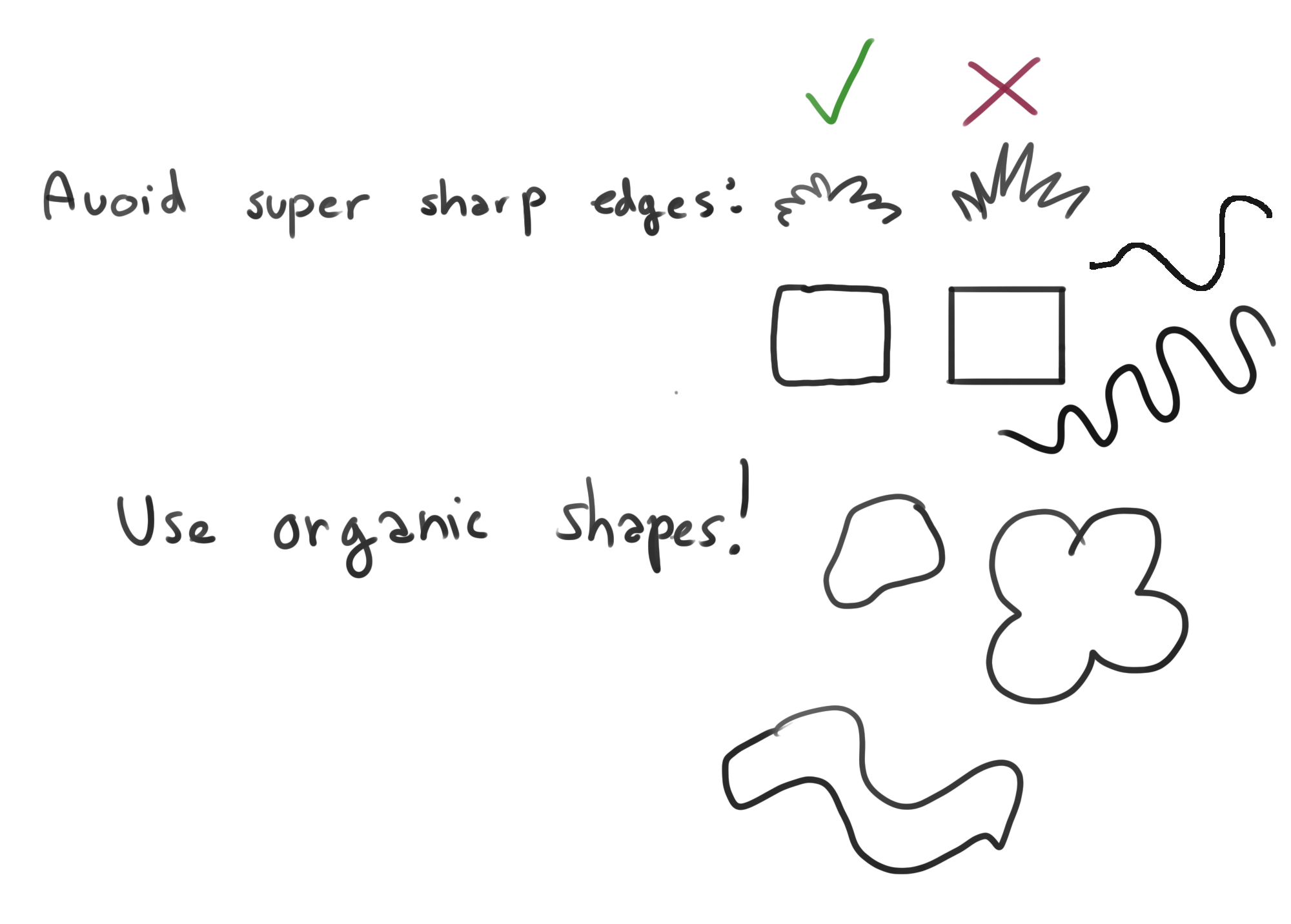
Fixed a hand full of typos. Clarified some small areas. Improved list of milestones. Added a Sound Design section. Added art director’s style guide to Art Design section. All comments from this week up to this point have been resolved.
02/21/2019
Updated list of sound effects
02/27/2019
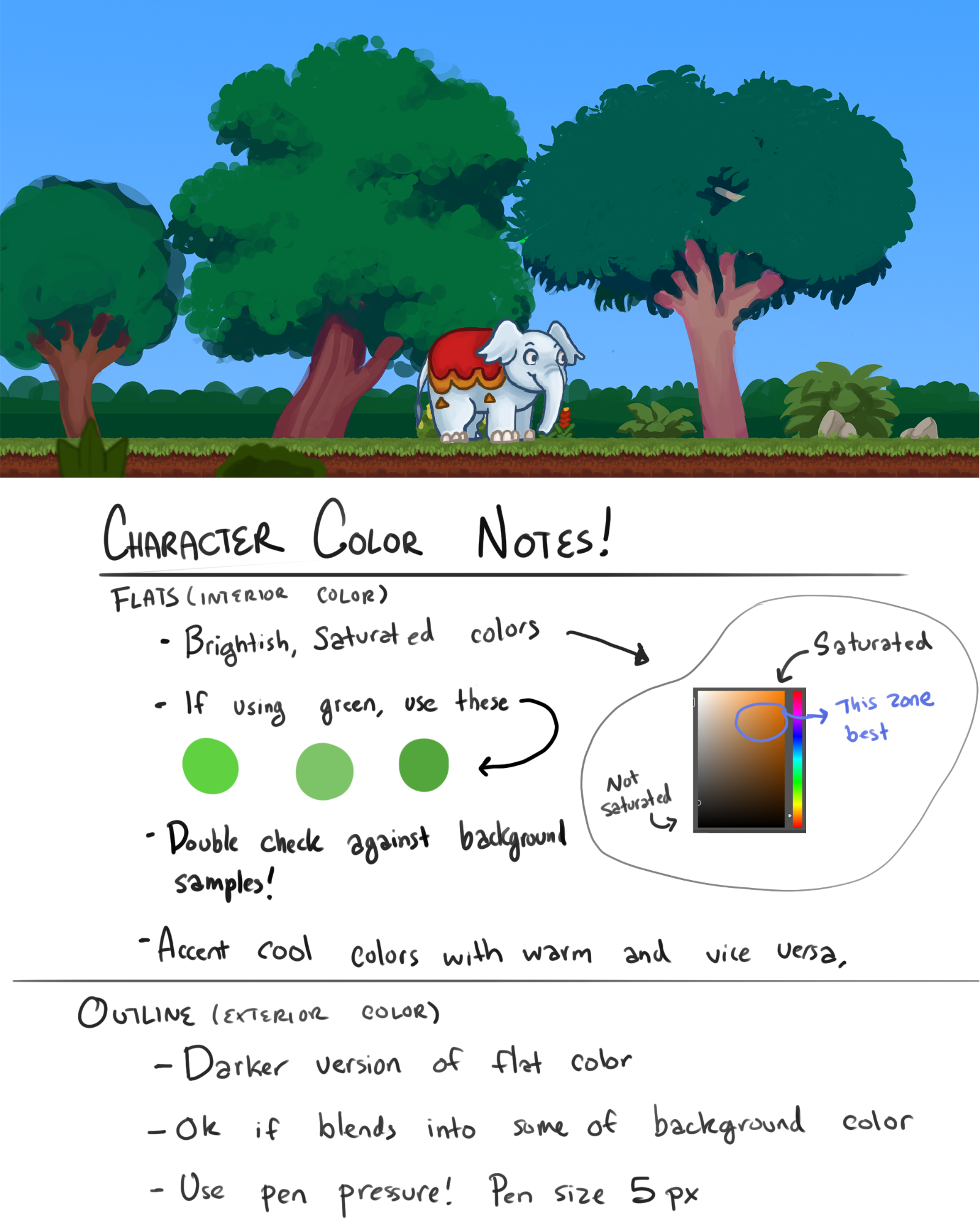
Added art director’s color notes to the Art Direction section. Added the list from “Needed Assets For Title Screen.docx” into the GDD under a new “User Interface, Title Screen, and Menu” section.
High Concept
Chucky & Dexter is a casual two player local co-op puzzle-platformer game. An alternative to violent action-heavy games, it is packed with cute characters, and a light-hearted atmosphere. The game is intended for couch co-op; controls are designed for two Xbox controllers (one for each player), and the visuals and level designs will be large enough to be seen from the couch.
The levels have to be navigated as a team. The core gameplay is platforming similar to BattleBlock Theater. What makes this game different is that the co-op is asymmetrical; both characters have a set of abilities and limitations that compliment one another.
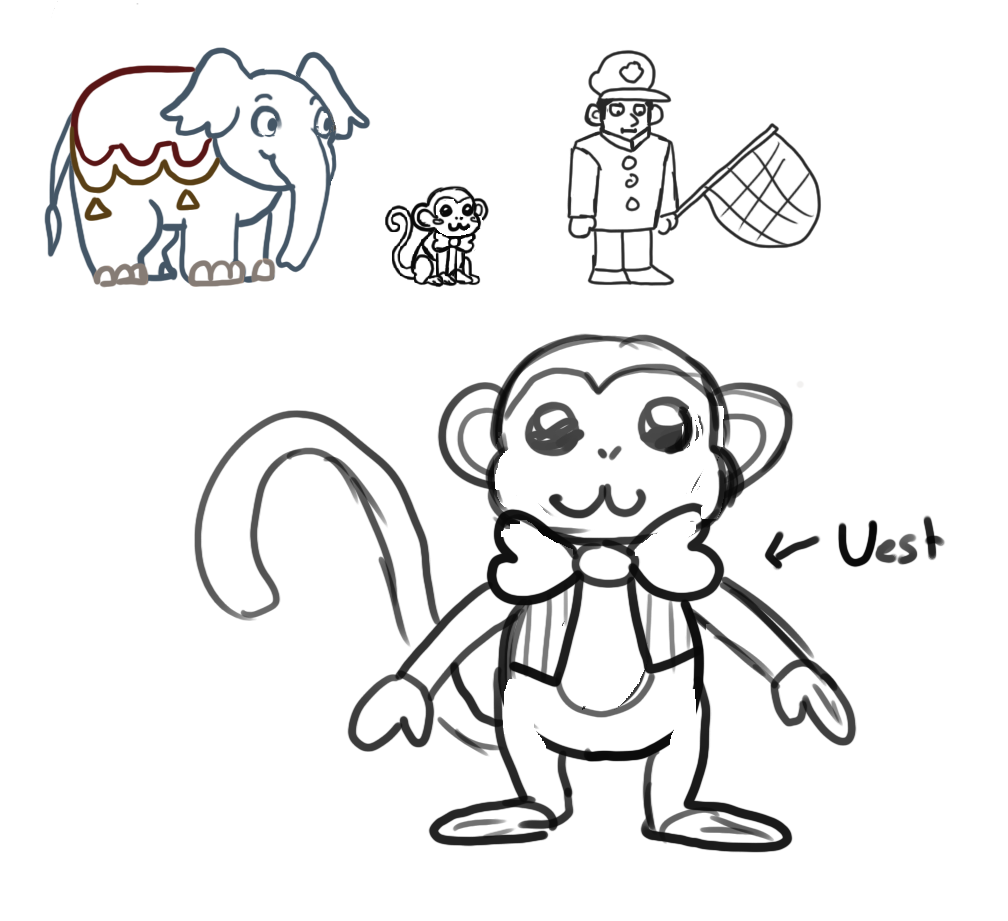
Player One plays as Chucky, a baby elephant who is slow and heavy, can move large obstacles, and can vacuum up objects with his trunk, then chuck them across the level (this includes your co-op partner)
Player Two plays as Dexter, a monkey who is small agile, and dexterous. He can interact with small buttons / control panels, can climb ladders and monkey bars. And can be thrown by Chucky to gain access to far areas of the level.
Together, Chucky and Dexter have to escape the circus while solving small puzzles to get to each new area, and avoiding obstacles, and animal control officers. For our demo we can build 3-5 levels. Each level must be exited by both Chucky AND Dexter via the exit door. The game is over when you complete all of the levels.
Milestones
Week 0 Milestone (02/13/2019)
- Game pitch document converted to a useable game design document
- People assigned to art team and programming team
- Trello set up for art team and programming team
- First tasks assigned to all team members
Week 1 Milestone (02/20/2019)
- Load levels as individual scenes
- Press button to restart the current level
- Co-op input (with two Xbox controllers) working
- Player movement for Chucky
- Player movement for Dexter
- Character swap button
- Art style determined for Characters, Objects, and Environments
- Placeholder Art
- Rough colored background in layers
- Generic environment tile sheet
- Placeholder art for most (if not all) items
Week 2 Milestone (02/27/2019)
- Co-op camera tracking properly
- Doors and buttons can be easily paired by the level designer
- 2D tile sheets loaded into tile pallet
- 3 prototype levels created with tile editor and placeholder assets
- 2D character animations blocked out in black and white
Week 3 Milestone (03/06/2019)
- Elevators working
- 5 prototype levels with nearly completed assets
- Chucky controls finished
- Dexter controls finished
Week 4 Milestone (03/13/2019)
- Music and sound effects in place
- Main Menu
- Start
- Quit
- Level Select
- Chucky’s aim trajectory line complete
- Animal Control Officer’s AI functional
- Playtest all levels, make adjustments as needed
Week 5 Milestone (03/20/2019)
- Polish / catch up on any missing tasks
- People with no tasks left can create extra levels
- Finished vertical slice, ready to be demoed!
Art Direction
Naming convention: EnvironmentTiles_128x128.png
Art is high-fidelity (AKA not pixel art) sRGB
Environment tiles are 1x1 Unity unit, and 128x128 pixels each.
Art submissions are to be submitted as .png (If Photoshop’s way of handling .png alpha channels causes problems there is an exporter plugin that we can use to fix it.)
For characters, don’t cramp your assets into the 128x128 space, give them room to breath, otherwise natural looking character movements are difficult to achieve.

Test out the size of the assets in the scene (especially compared to other similar assets) before detailing and or animating.
Art should be drawn at a slight angle, the doorways and characters will look extremely awkward if they are drawn exactly from the side angle

Sound Design
Sounds should be cartoony, and should not over-power the music
Music
Title Music
Main theme (Circus / Out in the jungle themed)
Sound Effects
- Chucky
- Footstep sounds
- Landing on the ground sounds
- Trunk suction
- Object loaded onto the tip of the trunk
- Object launched from trunk
- Dexter
- Footstep sounds
- Landing on the ground sounds
- Tree / Coconut
- Leaf rustling sounds
- Coconut hitting the ground softly
- Coconut shattering on surface
- Wooden Crate
- Sliding along the ground
- Hitting the ground softly
- Shattering from being kicked
- Buttons
- Button pressed / activated
- Button released / deactivated
- Elevator
- Moving up and down
- Finished moving
Controls (And Other Scripts)
Controls are designed with two Xbox controllers in mind.
Common Controls:
Chucky Controls:
Dexter Controls:
Co-Op Camera (keeps both characters framed on screen)
User Interface, Title Screen, and Menu
Neutral state: The object/menu option is not being hovered over.
Active state: The object/menu option is highlighted (being hovered over but not pressed).
Pressed state: The object/menu option is clicked on (or player presses A while it is highlighted) The active state must be noticeably different from the neutral states.
Title Screen
Menu Assets
Buttons
Level Select Screen
Level slot refers to an image of the level with some identifier for which one it is. I.e, screenshot of level one with “Level 1” in text below it.
The active state must be noticeably different from the other states
Level assets must consist of levels 1 - 5 and include assets for one named “Tutorial”
Creating fun names that match the theme of each level is acceptable as well, talk to the level designer about that.
Level Screenshots and/or animated gifs (Communicate with Level Designer whenever that is decided)
Menu Assets
- “Level Select” text
- Level Slot Background
- “B To Return” image
Buttons
- Level Slot (Neutral state, Active state, and Pressed state)
Options Screen
Menu Assets
- “Options” Text
- Background panel to see options clearly
- Custom art for a volume slider
- “Volume” text
- “B To Return” image
Level Design
Levels are to be built as individual scenes
“Game Handler” types of objects can be set to persist between level loads.
When designing levels consider the number of actions Chunky gets to perform vs the number of actions Dexter gets to perform. They should be as close to equal as possible. Don’t have Dexter doing everything while Chucky sits idle.
Level 1
Level 2
- introduce a few more puzzle elements
Level 3
- Introduce Animal Control Officer
Level 4
- Interesting puzzle design using many elements
Level 5
- Final challenge using as many puzzle elements as possible