# Art

# Resources

<table border="1" id="bkmrk-main-character-for-s" style="border-collapse: collapse; width: 100%; height: 130.375px;"><colgroup><col style="width: 50.0596%;"></col><col style="width: 50.0596%;"></col></colgroup><tbody><tr style="height: 29.7969px;"><td style="height: 29.7969px;">Main Character for scale reference</td><td style="height: 29.7969px;">&gt;COMING SOON&lt;</td></tr><tr style="height: 35.3906px;"><td style="height: 35.3906px;">BlenderKit texture library Addon </td><td style="height: 35.3906px;">[https://www.blenderkit.com/](https://www.blenderkit.com/)</td></tr><tr style="height: 29.7969px;"><td style="height: 29.7969px;">Xury's Punk character sculpting workflow </td><td style="height: 29.7969px;">[Punk sculpting playlist](https://www.youtube.com/watch?v=2_XLOEN8Z5Y&list=PLFei7Xknm2X7-5JCeVtXSynuz1xOifAbw)</td></tr><tr style="height: 35.3906px;"><td style="height: 35.3906px;">PureRef Reference Boards </td><td style="height: 35.3906px;">[https://www.pureref.com/](https://www.pureref.com/)</td></tr><tr><td>Qremeshify to auto re-mesh with quads (free) addon</td><td>[https://ksami.gumroad.com/l/QRemeshify](https://ksami.gumroad.com/l/QRemeshify)</td></tr></tbody></table>

# Style Guidelines

### Scale + Proportions 

[![image.png](https://docs.bugjam.dev/uploads/images/gallery/2026-02/scaled-1680-/9QFimage.png)](https://docs.bugjam.dev/uploads/images/gallery/2026-02/9QFimage.png)[![image.png](https://docs.bugjam.dev/uploads/images/gallery/2026-02/scaled-1680-/ZOHimage.png)](https://docs.bugjam.dev/uploads/images/gallery/2026-02/ZOHimage.png)
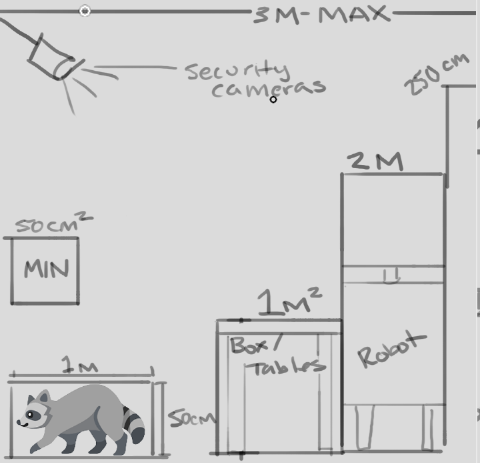
All proportions will be very exaggerated in order for the tiny tanuki to navigate the environment. interactive elements will be placed within 3m of the floor. The main playable character has a size of 100cm x 50cm- all reachable surfaces will be 100cm tall (table tops / switches / crates/ etc )

Larger characters and elements, like the security robots, should be a max of 2m tall. Security cameras should be placed at 3m above the ground to be visible to the tanuki but out of reach. Non-interactive elements will be a max of 250cm tall to fit within frame

Props that the tanuki can transform into should fit within 50cm-100cm

No props should be smaller than 25cm or larger than 3m

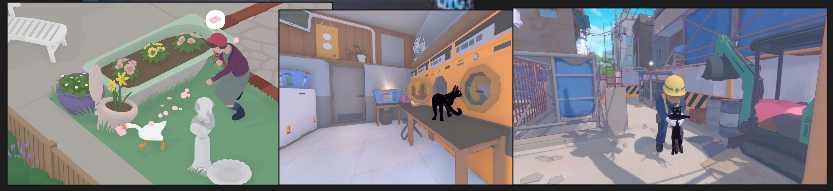
When translating elements to the game style, proportions will be exaggerated for a playful effect. See the example above^ whenever there are areas that can be exaggerated without losing their silhouette, they should be exaggerated. Below are examples of how similar games have pulled off this scale exaggeration- the goose and the cat would be much smaller, but the worlds don't feel "looming" or overly giant around them.

[![image.png](https://docs.bugjam.dev/uploads/images/gallery/2026-02/scaled-1680-/Ld3image.png)](https://docs.bugjam.dev/uploads/images/gallery/2026-02/Ld3image.png)
### Granularity + Detail 

[![image.png](https://docs.bugjam.dev/uploads/images/gallery/2026-02/scaled-1680-/mmqimage.png)](https://docs.bugjam.dev/uploads/images/gallery/2026-02/mmqimage.png)
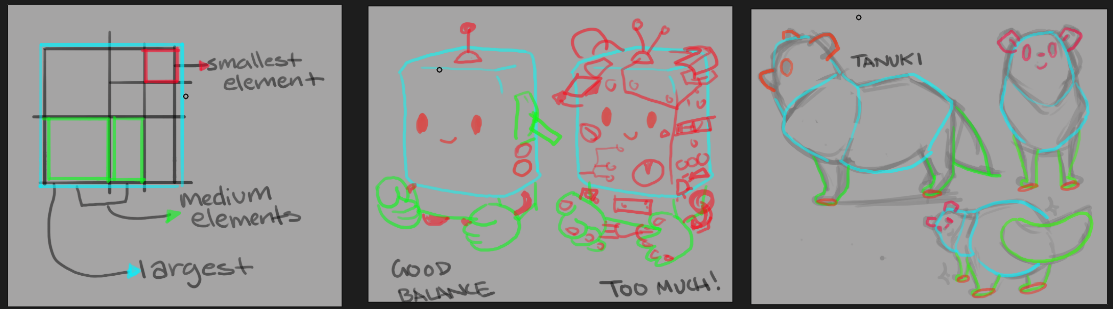
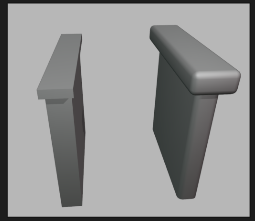
Designs should be sorted into large, medium, and small elements- finding a balance between them. There should be a main form that is the largest element and make up 75% of the object or character's silhouette. Medium elements should be 25%-33% of the size of the largest shape, and take up about 20% of the silhouette. Small elements should only have a very minimal impact on the characters main silhouette, 5%. See the example above, the robot on the left is easy to read at a glance, and still includes cute details - like a few buttons and levers. However the robot on the right is too busy to understand, with too much visual information and the main shape gets lost. For our game, we want to keep a good balance and use small elements that are no smaller than what is pictured above, and used sparingly to tell a story- not to overwhelm the viewer.

This is a very simplified style, so start by seeing what the **least** possible amount of information is necessary in order to communicate the object or character, and build up from there

### Edges + Beveling 

[![image.png](https://docs.bugjam.dev/uploads/images/gallery/2026-02/scaled-1680-/u6gimage.png)](https://docs.bugjam.dev/uploads/images/gallery/2026-02/u6gimage.png)
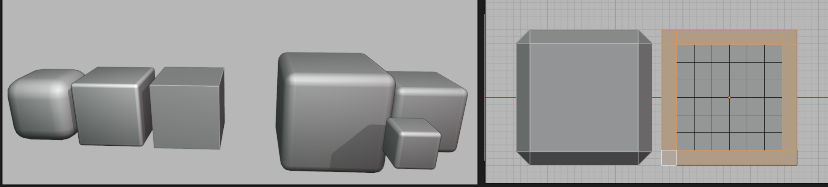
1m = 0.1m bevel distance

2m = 0.2m bevel distance

3m = 0.3m bevel distance

This game will be a very soft, inviting , and playful environment. Because of this, edges will be rounded off but there is a level of standardization necessary to keep the game cohesive. On the left you can see 3 cubes, one that is super round, one that is a little beveled but still sharp, and one that has completely sharp edges. You can see these each have a different feel to them. On the right is the level of softness we will be using for our game- 10%. so, if you love numbers you can take that literally, and apply a 0.1 bevel to a 1m cube, or using the reference on the right, try to match that amount- using an orthographic view is very helpful when setting this up, or ideally a bevel modifier, where you can easily and non destructively adjust the bevel proportionately to the shape.

This applies mostly to prop building, like shelves and architecture- but if you are doing organic modeling please still keep this in mind and don't include any hard edges or sharp corners

### High Poly Sculpt Pass 

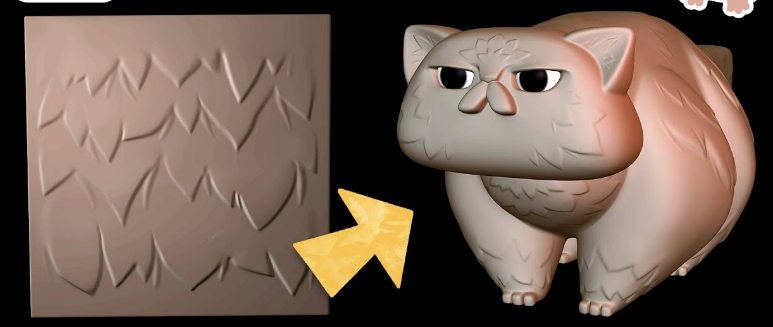
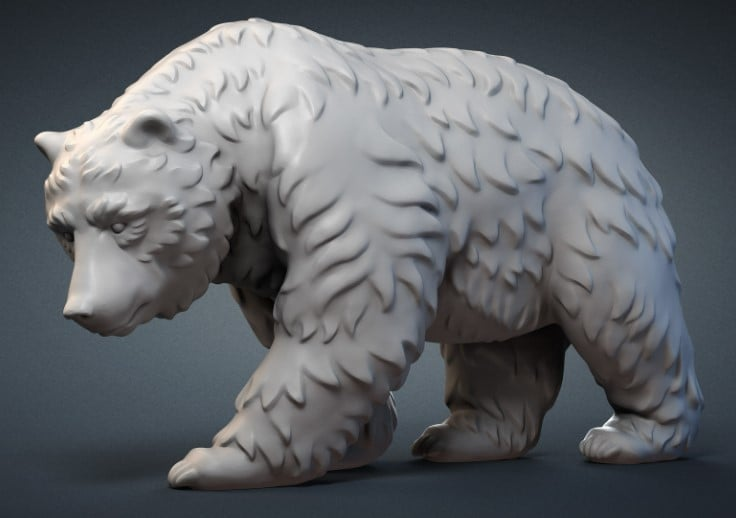
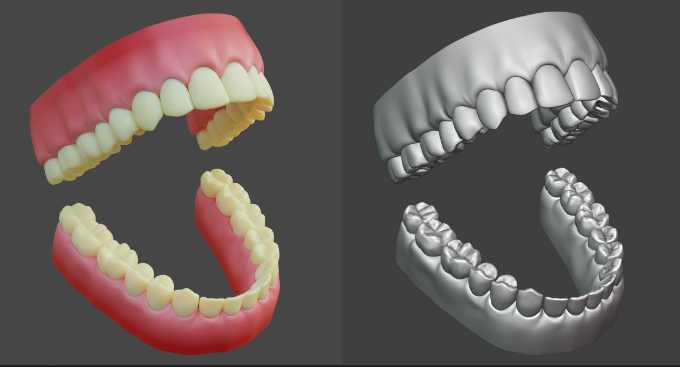
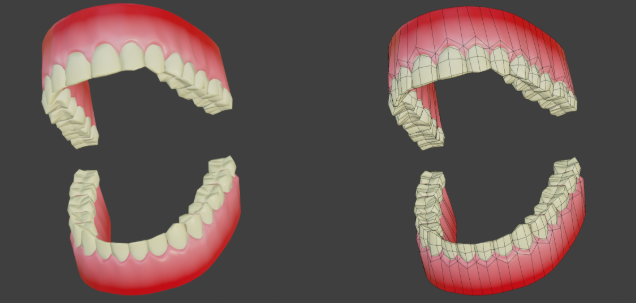
All assets will include a high poly sculpt pass! DONT BE OVERWHELMED this is still a very stylized game, NO ONE should be doing hyperrealism but we are going to learn a high to low poly baking workflow, what this means is that when we make each element- we will be adding some smaller details in a sculpt pass that add more interest + history to the item / character. For example, when making the tanuki, the sculpt pass will include adding some areas of chunky fur, or if you are making a crate, finding areas to add a chipped piece of wood, a dent in the side of a can, or a chipped corner on a table. These details will be baked onto the mesh later

We are going to be using a high - low polygon workflow, which means you can go pretty high when working on the details of your model! If your computer can handle it- go for it! Please see Xury's punk character series to understand this workflow in depth. Included example is this pair of teeth by Xury- see the difference in the original sculpt vs final game model

[![image.png](https://docs.bugjam.dev/uploads/images/gallery/2026-02/scaled-1680-/X5Uimage.png)](https://docs.bugjam.dev/uploads/images/gallery/2026-02/X5Uimage.png)
[![image.png](https://docs.bugjam.dev/uploads/images/gallery/2026-02/scaled-1680-/NzHimage.png)](https://docs.bugjam.dev/uploads/images/gallery/2026-02/NzHimage.png)
[![image.png](https://docs.bugjam.dev/uploads/images/gallery/2026-03/scaled-1680-/n9uimage.png)](https://docs.bugjam.dev/uploads/images/gallery/2026-03/n9uimage.png)
[![image.png](https://docs.bugjam.dev/uploads/images/gallery/2026-02/scaled-1680-/JW8image.png)](https://docs.bugjam.dev/uploads/images/gallery/2026-02/JW8image.png)
### Materials 

WIP

# Scale and Proportions

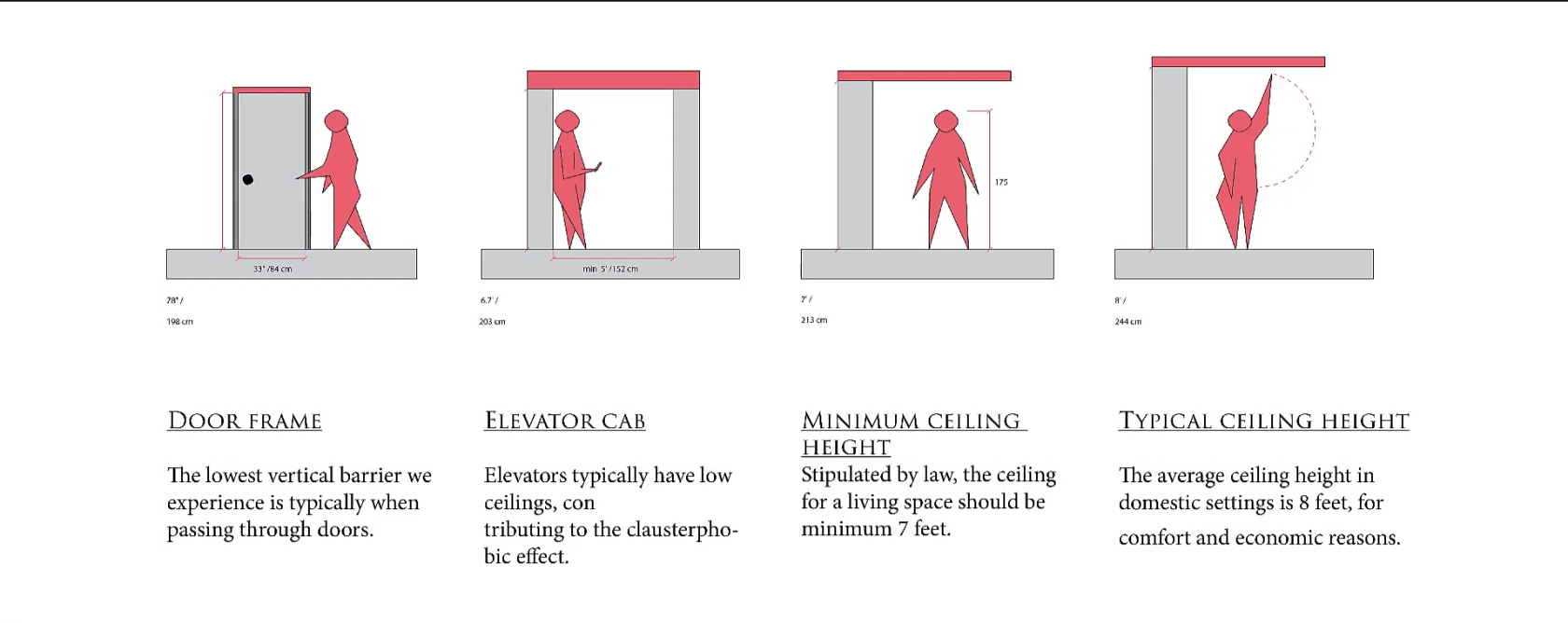
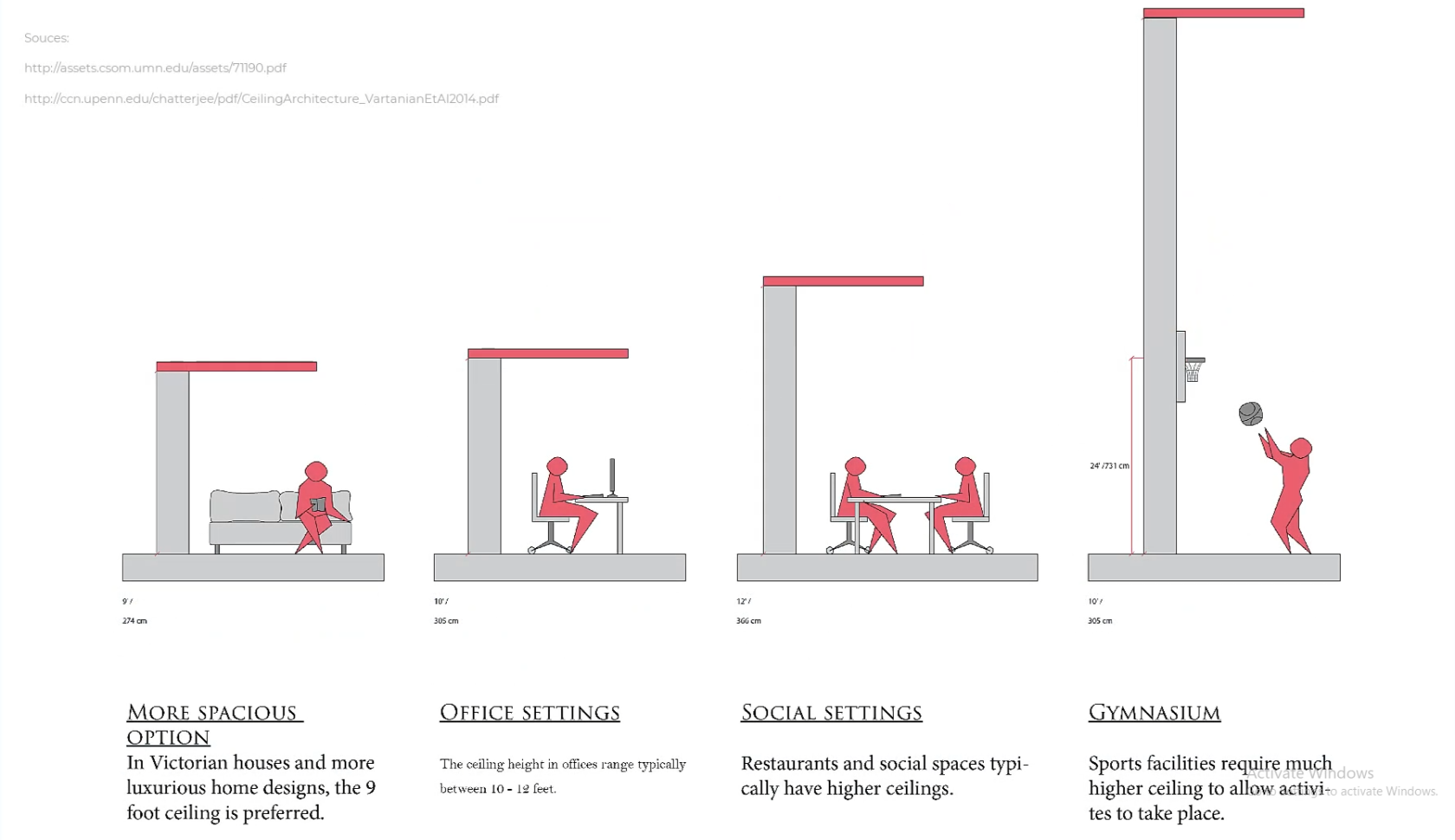
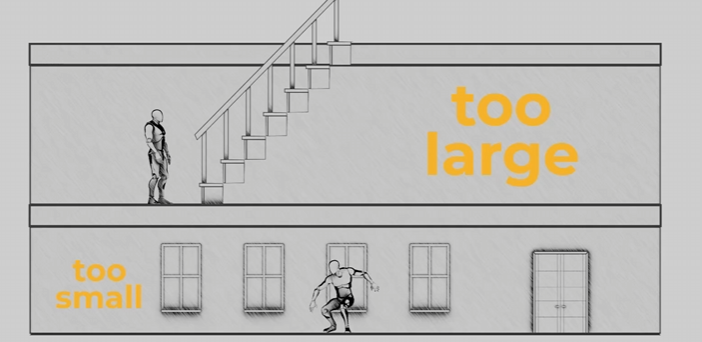
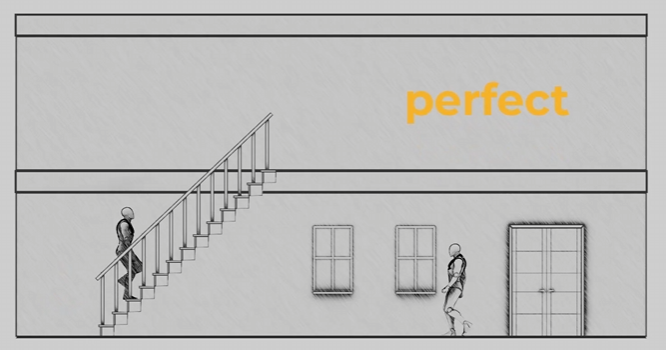
We will be working with standard Blender units aka meters. One meter is one Blender unit. One meter is also 100cm, so working from measurements like the ones attached is easier than it seems if you're used to imperial!

[![image.png](https://docs.bugjam.dev/uploads/images/gallery/2026-02/scaled-1680-/H2Oimage.png)](https://docs.bugjam.dev/uploads/images/gallery/2026-02/H2Oimage.png)[![image.png](https://docs.bugjam.dev/uploads/images/gallery/2026-02/scaled-1680-/oauimage.png)](https://docs.bugjam.dev/uploads/images/gallery/2026-02/oauimage.png)
[![image.png](https://docs.bugjam.dev/uploads/images/gallery/2026-02/scaled-1680-/LNtimage.png)](https://docs.bugjam.dev/uploads/images/gallery/2026-02/LNtimage.png)[![image.png](https://docs.bugjam.dev/uploads/images/gallery/2026-02/scaled-1680-/fBUimage.png)](https://docs.bugjam.dev/uploads/images/gallery/2026-02/fBUimage.png)
[![image.png](https://docs.bugjam.dev/uploads/images/gallery/2026-02/scaled-1680-/KLvimage.png)](https://docs.bugjam.dev/uploads/images/gallery/2026-02/KLvimage.png)
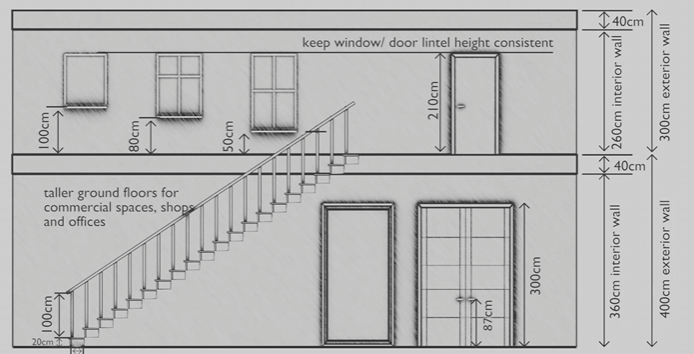
<p class="callout success">For scale, please also utilize a "main\_character" mesh (attached) to compare to your mesh whenever possible! When working, we will start with a blockout for your objects/ character that will be tested in the game engine.</p>

*reference photos sourced Schoolism. Life – Lesson 71. Schoolism. Accessed 2/11/26. [https://schoolism.com/s/life/course/lessons/71](https://schoolism.com/s/life/course/lessons/71)*

# Materials List

Pre approved textures and materials through blenderkit! Please make sure you use materials from this list!

\*\*\*list coming soon!\*\*\*\*

# WIP: Basic Requirements For The Projects Goals

**tanuki night at the meowseum requirements as described by Alice , with Embers goals in mind**

we should select a few real world museums to blend styles from to make our unique museum

the style of post fall modernism,

a place once for public use, now faded into disuse with the fall of mankind.

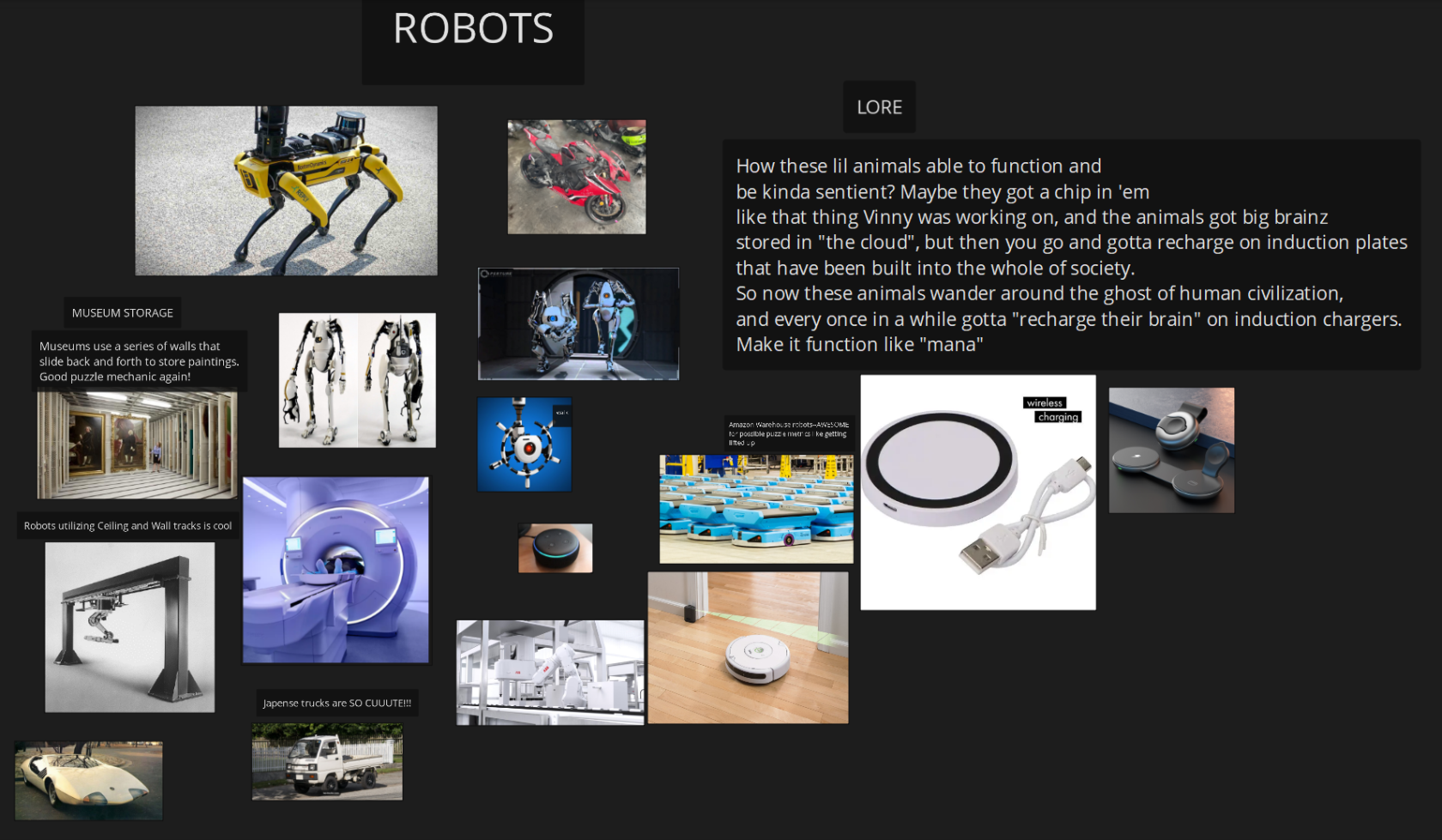
but the security robots remain roaming the halls.

renewable power means they might guard this place forever.

Concept art , style agreement, modeling scope decided

blender needs

1 tanuki model

concept  
model  
rig  
animation

1 guard bot

concept  
model  
rig  
animation

1 basic level modular pack begun.

floor tiles,

wall tiles,

window frames,

props

concept ,style, reference needed for all

vase

statue

pole that you hang

the velvet rope on

the velvet rope

painting frames

diamond

pedestal

ceiling lights

display cases

anything that would go in a case

take your pick

go wild

security camera

laser emitter

mirror deflector.

the outside of the museum where you get put before selecting an entrance

needs foliage, trees, grass, pavement and such.

to begin imagine our museum is nothing but, vases paintings and a diamond.   
variety of objects increase as people claim a desire to add something.   
personally i think making parody of real pieces of art is fun.

like a simpler or funny version of the original.

or when you turn into something, you are like the original.

but with like little cute ears and theres a racoon face on the object.

godot needs:

player capsule controller,

idle,walk,run state machine

guard,

idle walk run state machine

navmesh

grey box level layout basics.

security camera set up.

Tooling pipeline requests:

a way to turn out modular architectural kit , into a level, faster.

aka snapping scripts based on object selected, not sure what blender is capable of.

might already exist.

week one should end with a grey box level of no specific design

explored by one capsule collider 3rd person action character controller.

we should have a clear concept of the museums look,

we should have v1 of our guard bot and camera drawn,

and maybe modeled but not animated and textured,

that we can place into the scene

and start building things like vision cones, follow systems,

work out the code for navigating the nav mesh,

before we start loading the scene with production models we should focus on basic function and form

in preparation for week 2 we could aim to have modeled, rigged ,and animations roughed out for our two animated characters.

and some agreed form for the the layout of our museum formed through greyboxing the space out. and doing flat floorplan drawings.

# Mood boards add your own!

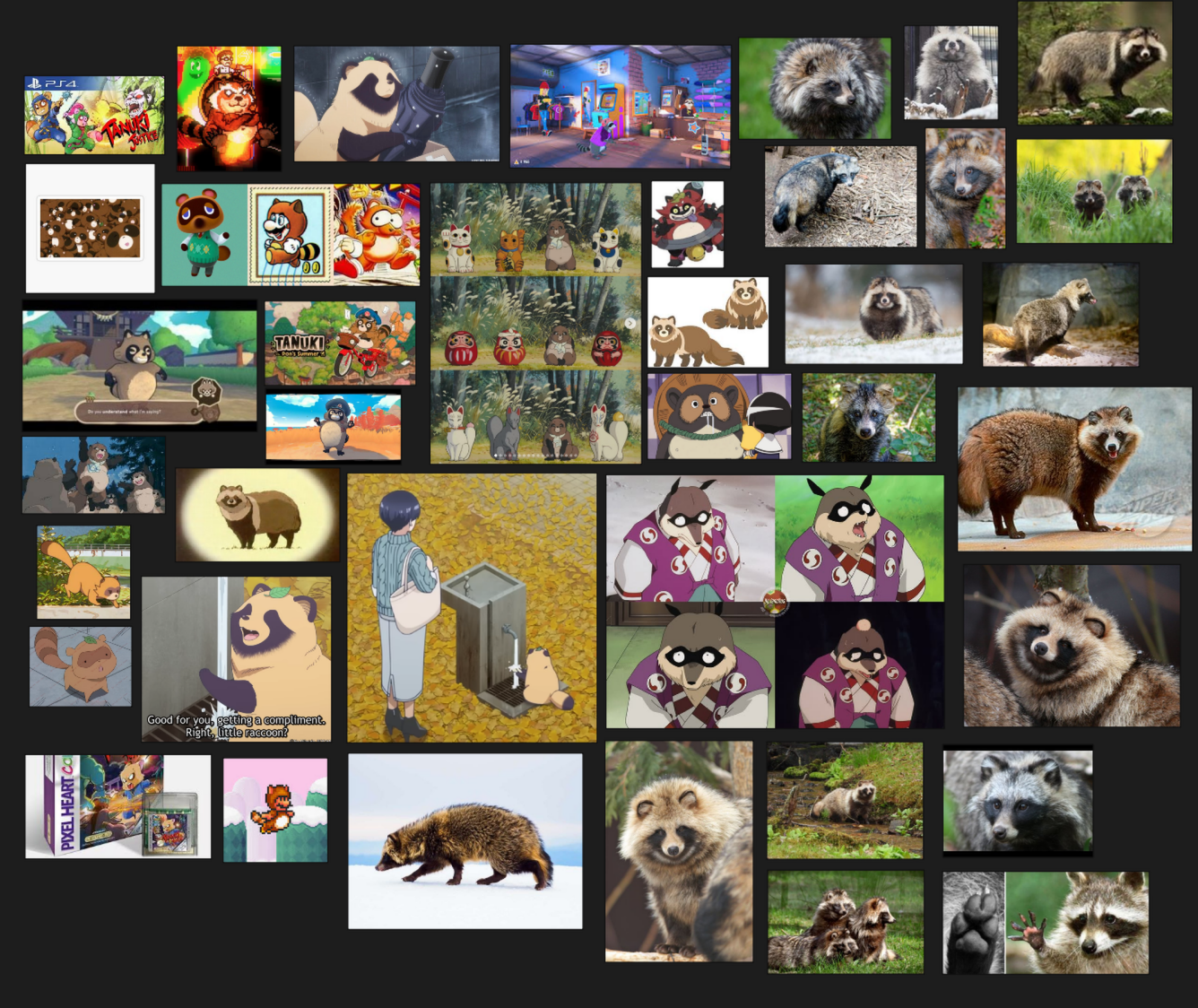
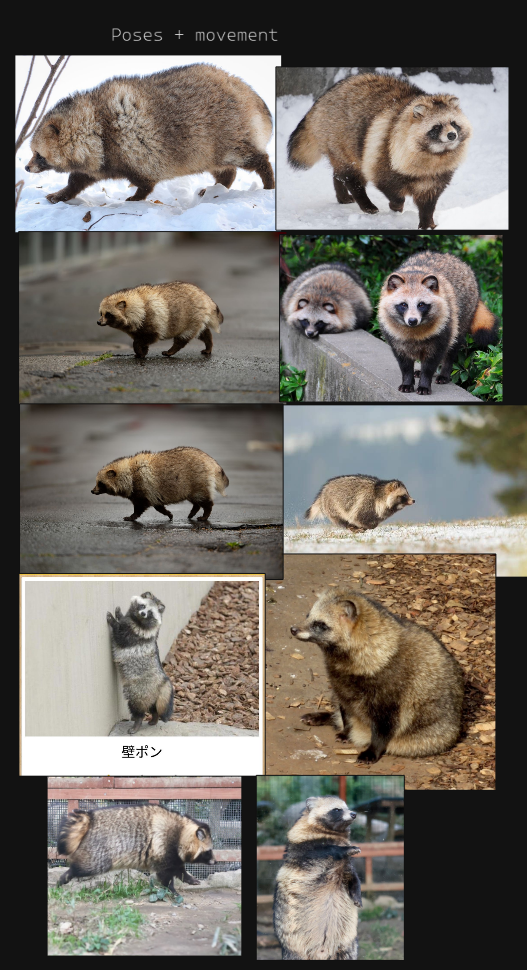
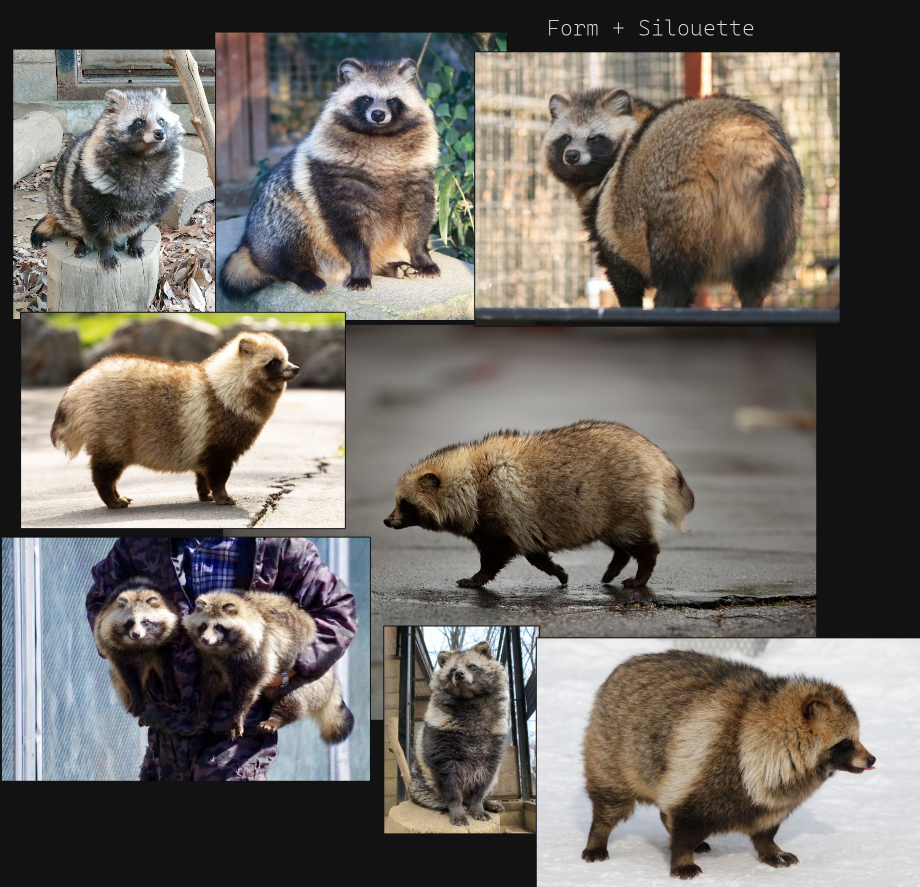
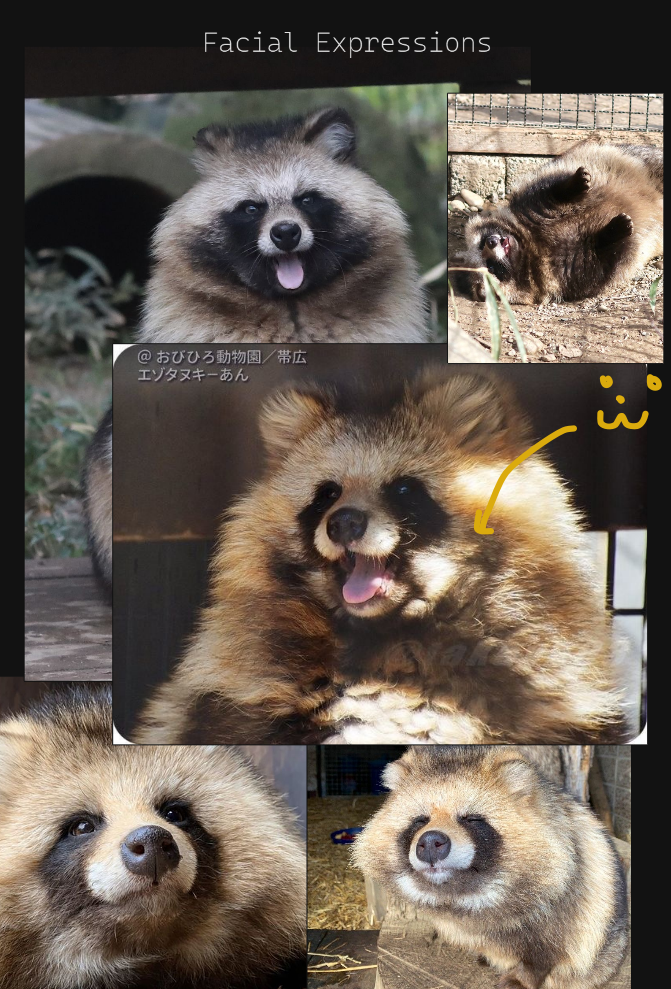
We have to decide what our tanuki would look like!

##### TANUKI

[![image.png](https://docs.bugjam.dev/uploads/images/gallery/2026-02/scaled-1680-/ryjimage.png)](https://docs.bugjam.dev/uploads/images/gallery/2026-02/ryjimage.png)
[![image.png](https://docs.bugjam.dev/uploads/images/gallery/2026-02/scaled-1680-/VZqimage.png)](https://docs.bugjam.dev/uploads/images/gallery/2026-02/VZqimage.png)
[![image.png](https://docs.bugjam.dev/uploads/images/gallery/2026-02/scaled-1680-/gbbimage.png)](https://docs.bugjam.dev/uploads/images/gallery/2026-02/gbbimage.png)
[![image.png](https://docs.bugjam.dev/uploads/images/gallery/2026-02/scaled-1680-/RWjimage.png)](https://docs.bugjam.dev/uploads/images/gallery/2026-02/RWjimage.png)
[![image.png](https://docs.bugjam.dev/uploads/images/gallery/2026-02/scaled-1680-/n3timage.png)](https://docs.bugjam.dev/uploads/images/gallery/2026-02/n3timage.png)
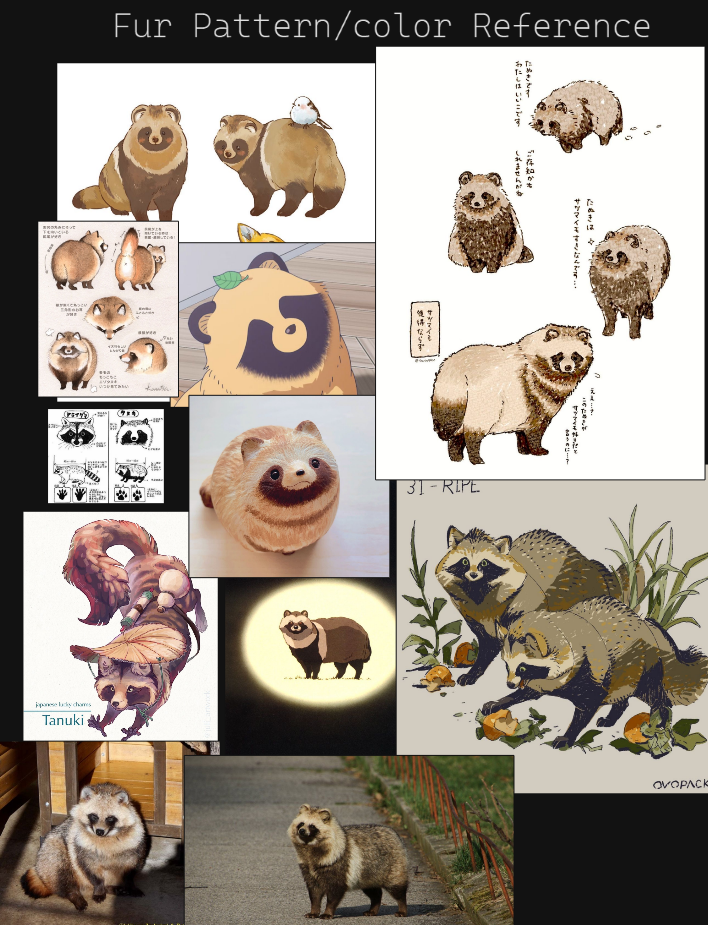
here is a swatch of representations for tanuki in media, gaming and anime.   
we must discuss what is in scope, what we have the skill to achieve and choose.

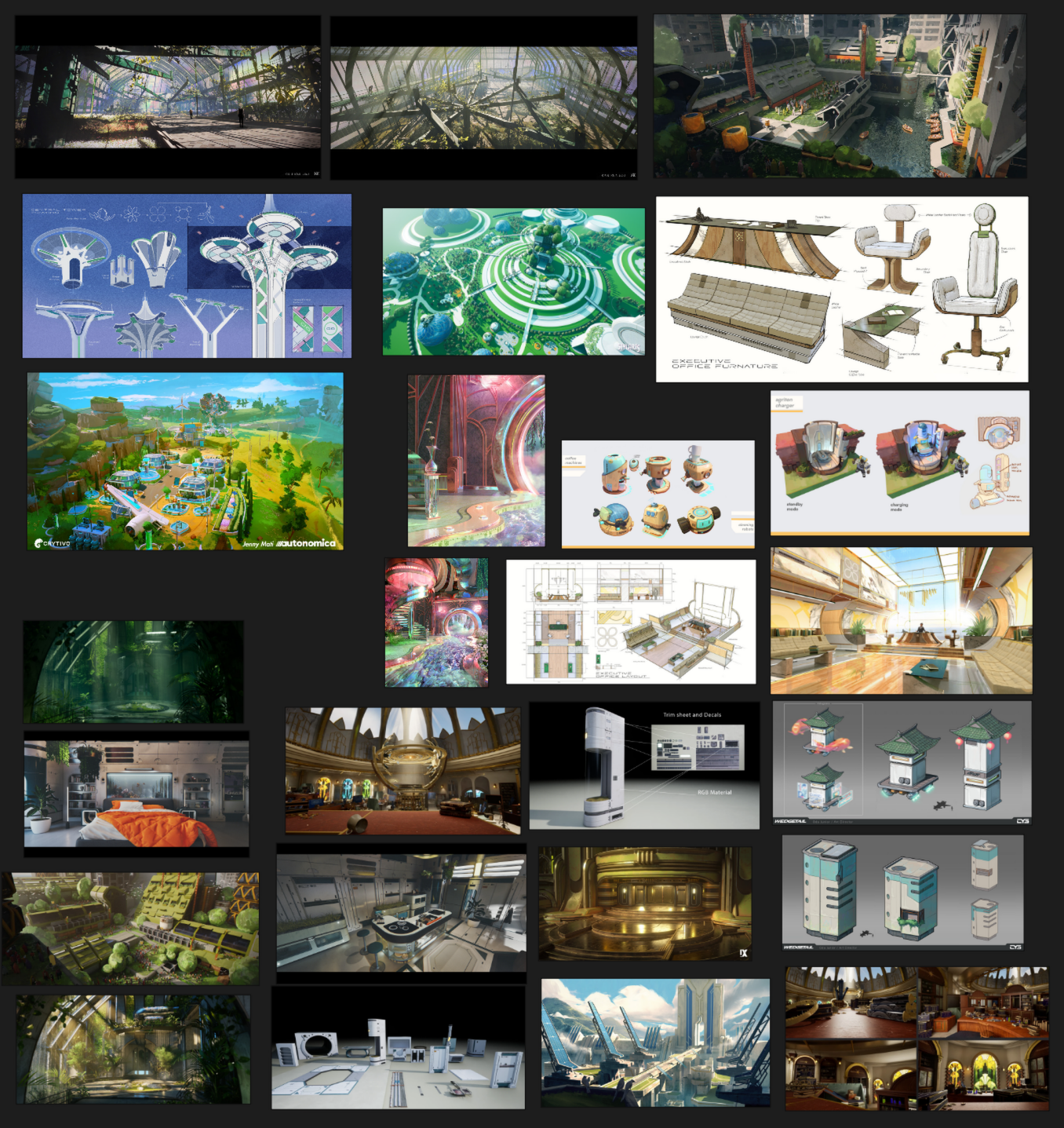
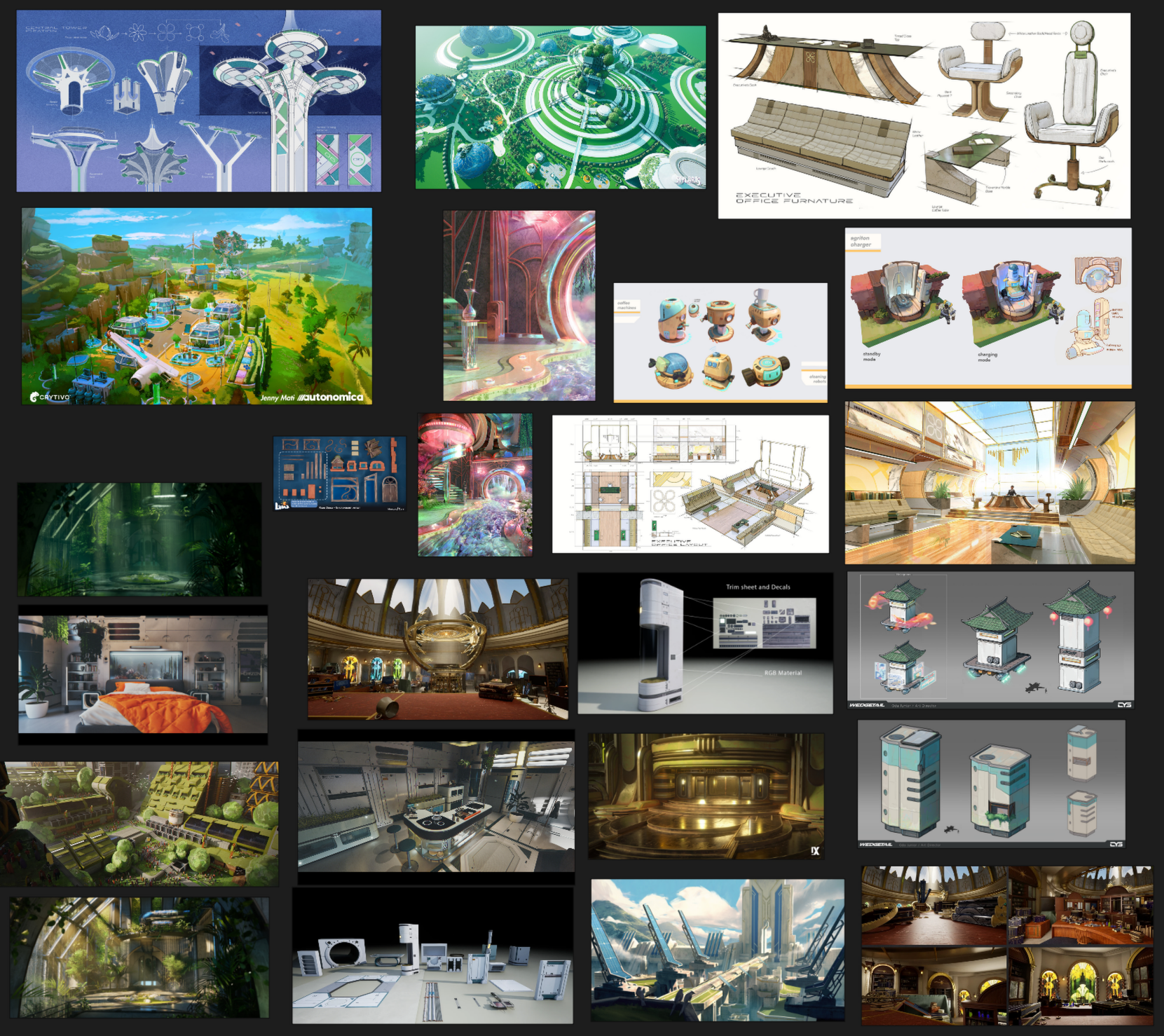
##### **FUTURISM**

[![image.png](https://docs.bugjam.dev/uploads/images/gallery/2026-02/scaled-1680-/bSgimage.png)](https://docs.bugjam.dev/uploads/images/gallery/2026-02/bSgimage.png)
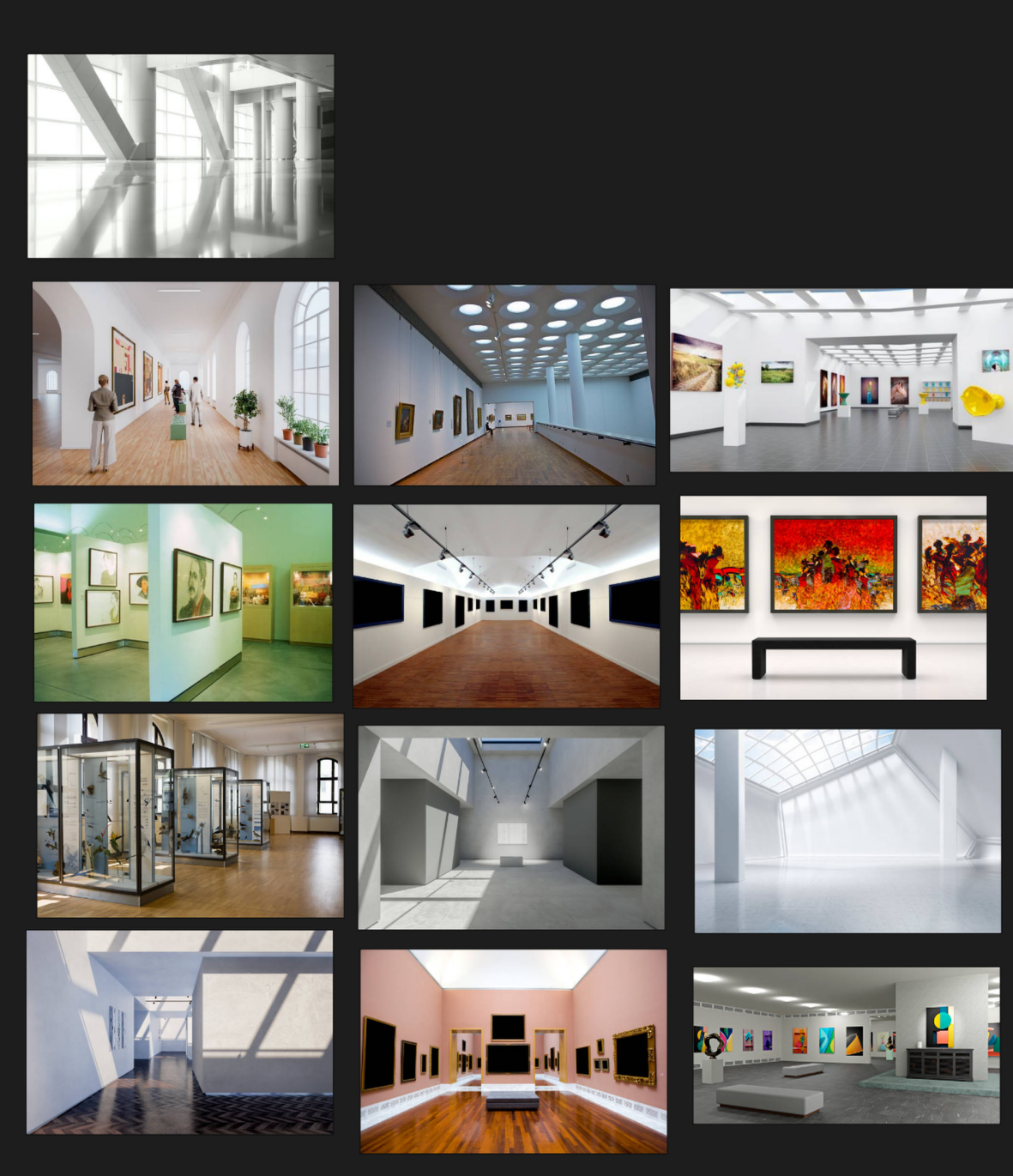
##### **MODERN MUSEUM INTERIORS** 

[![image.png](https://docs.bugjam.dev/uploads/images/gallery/2026-02/scaled-1680-/o5aimage.png)](https://docs.bugjam.dev/uploads/images/gallery/2026-02/o5aimage.png)
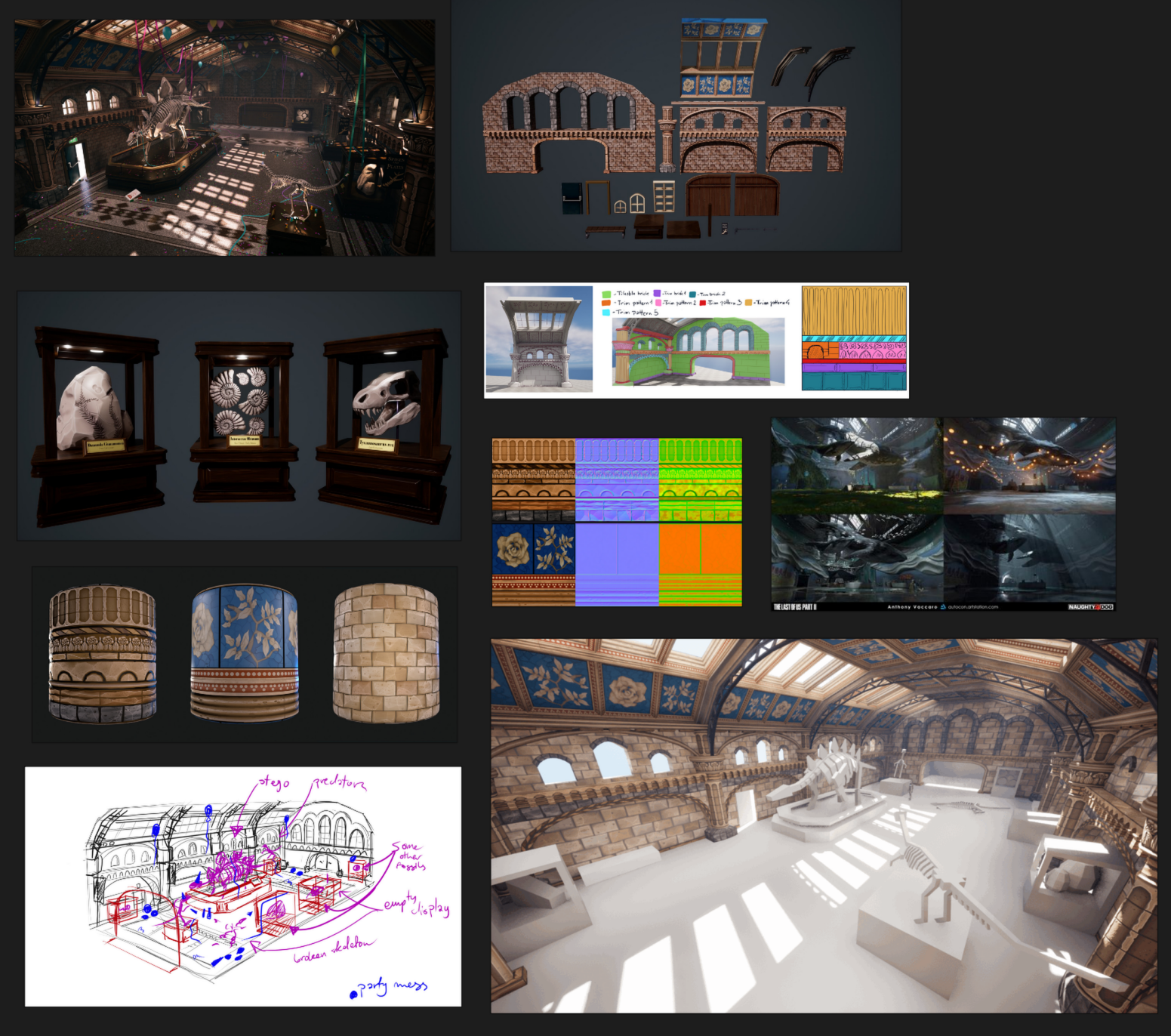
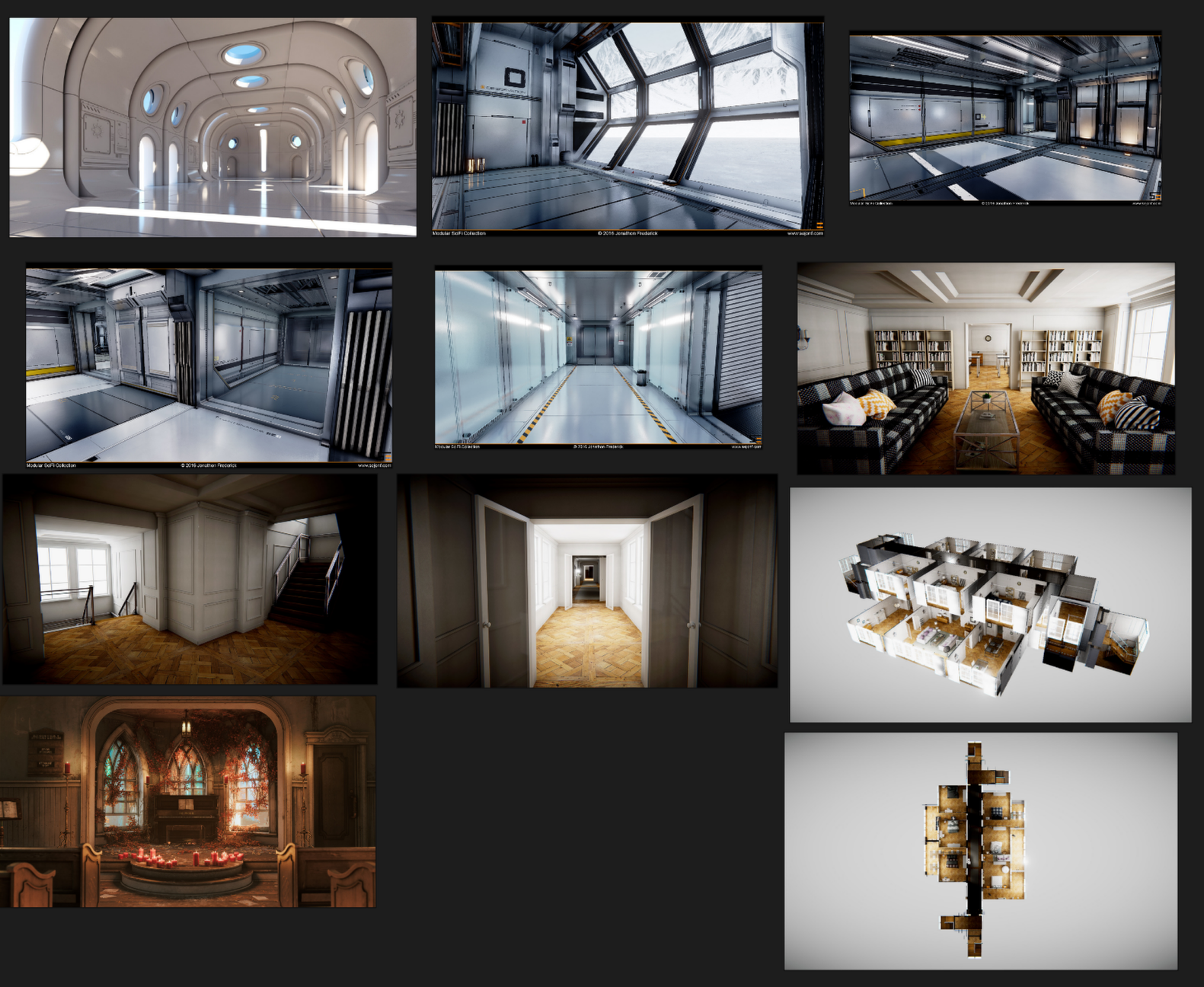
##### **museum modular kits**  


[![image.png](https://docs.bugjam.dev/uploads/images/gallery/2026-02/scaled-1680-/32eimage.png)](https://docs.bugjam.dev/uploads/images/gallery/2026-02/32eimage.png)
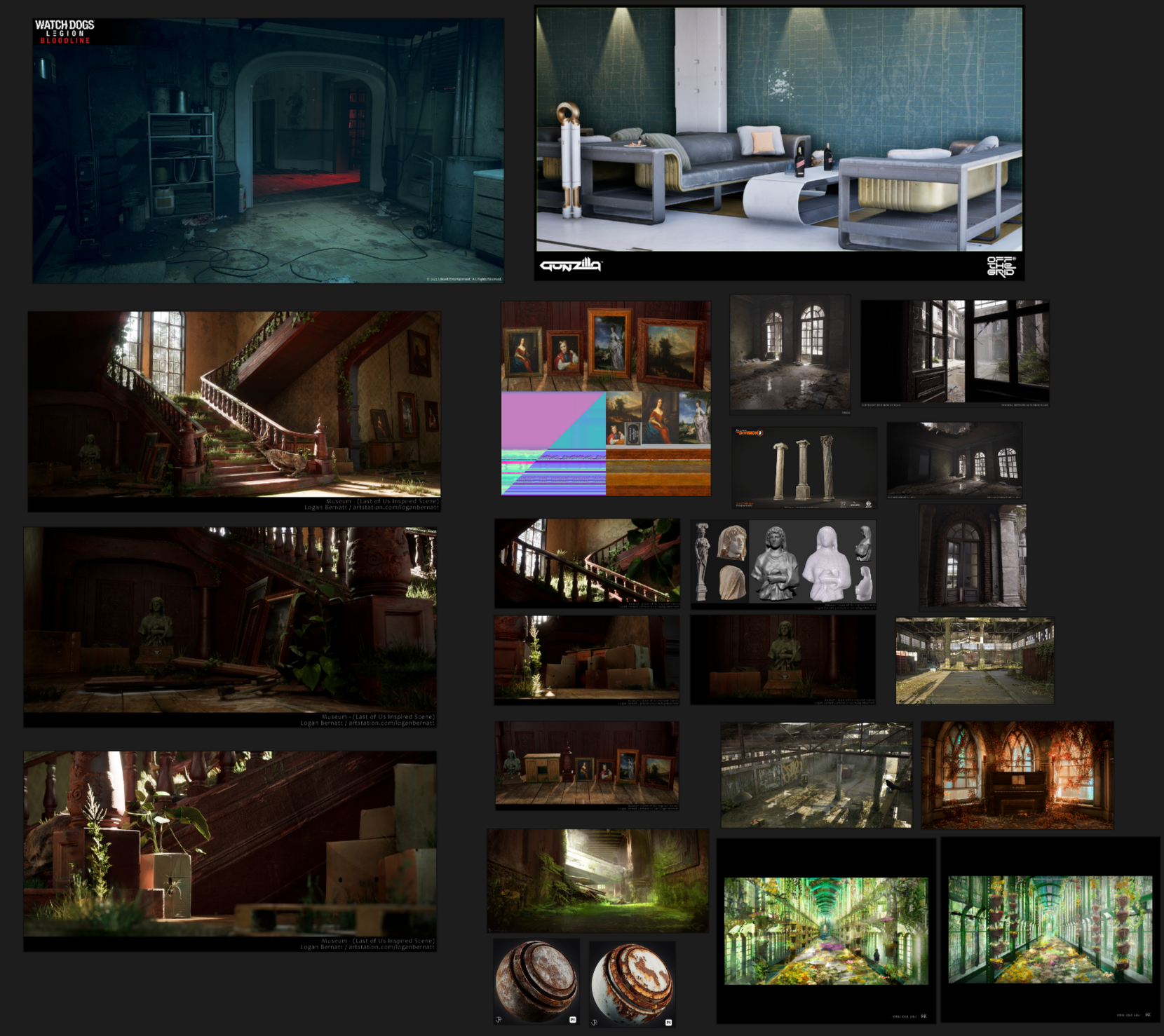
##### **ABANDONED INTERIORS**

[![image.png](https://docs.bugjam.dev/uploads/images/gallery/2026-02/scaled-1680-/UAhimage.png)](https://docs.bugjam.dev/uploads/images/gallery/2026-02/UAhimage.png)
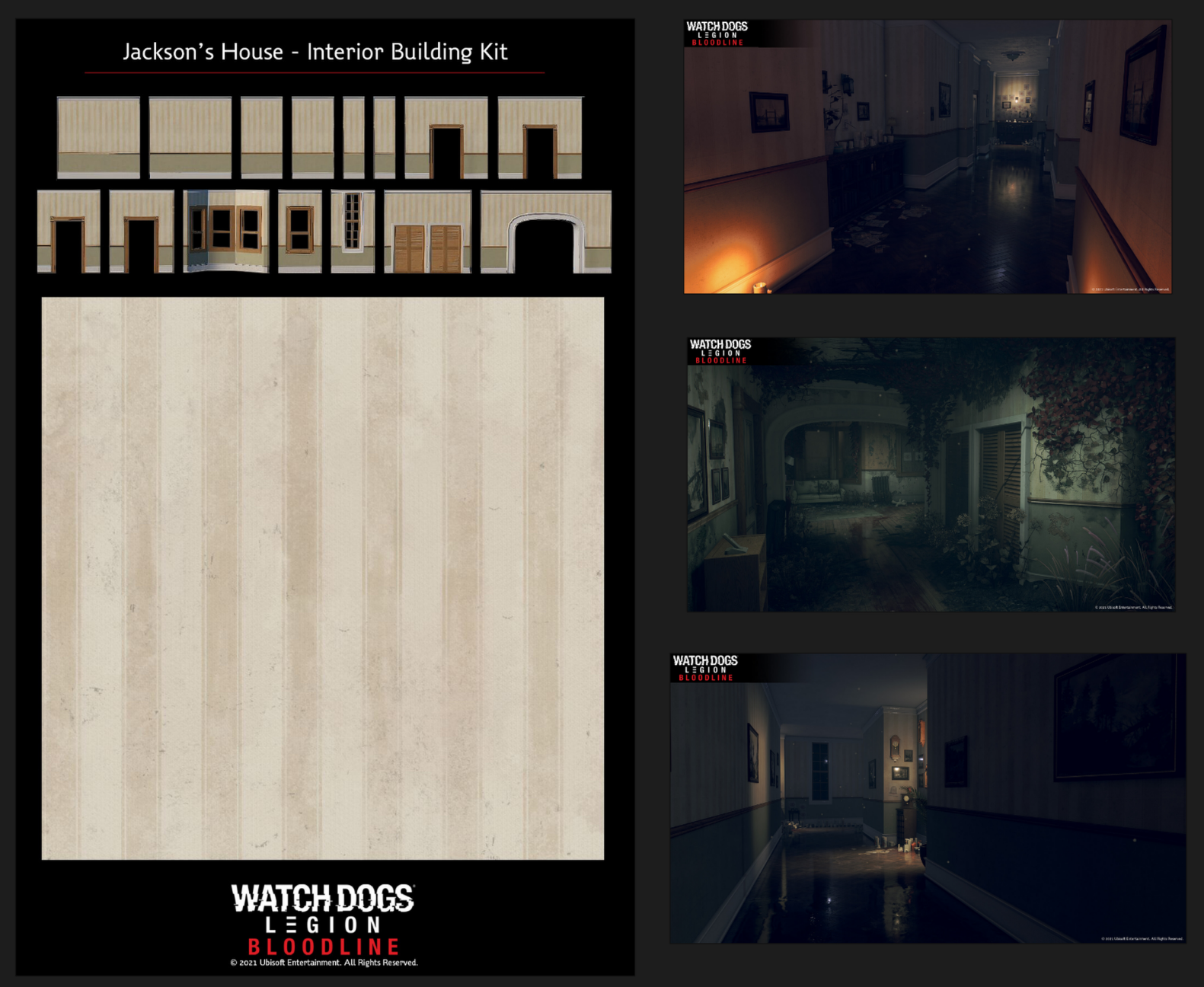
##### **INTERIOR KIT AND TRIM SHEET EXAMPLE**

[![image.png](https://docs.bugjam.dev/uploads/images/gallery/2026-02/scaled-1680-/nwJimage.png)](https://docs.bugjam.dev/uploads/images/gallery/2026-02/nwJimage.png)
##### **Liminal Future Spaces**

[![image.png](https://docs.bugjam.dev/uploads/images/gallery/2026-02/scaled-1680-/VPkimage.png)](https://docs.bugjam.dev/uploads/images/gallery/2026-02/VPkimage.png)
##### **Solar Punk Future** 

[![image.png](https://docs.bugjam.dev/uploads/images/gallery/2026-02/scaled-1680-/qqsimage.png)](https://docs.bugjam.dev/uploads/images/gallery/2026-02/qqsimage.png)
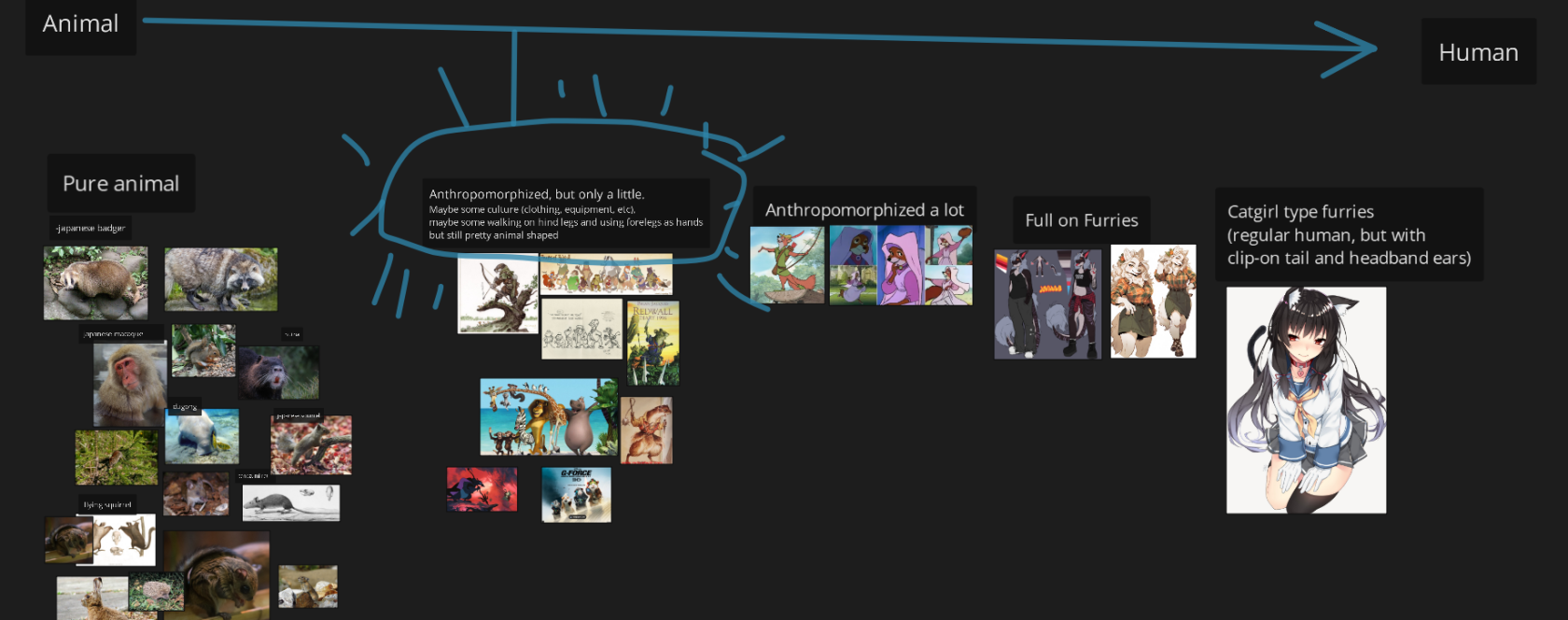
##### Animal to Human Spectrum

[![image.png](https://docs.bugjam.dev/uploads/images/gallery/2026-02/scaled-1680-/dKHimage.png)](https://docs.bugjam.dev/uploads/images/gallery/2026-02/dKHimage.png)
#####   
  
[![image.png](https://docs.bugjam.dev/uploads/images/gallery/2026-02/scaled-1680-/pRkimage.png)](https://docs.bugjam.dev/uploads/images/gallery/2026-02/pRkimage.png)  
  
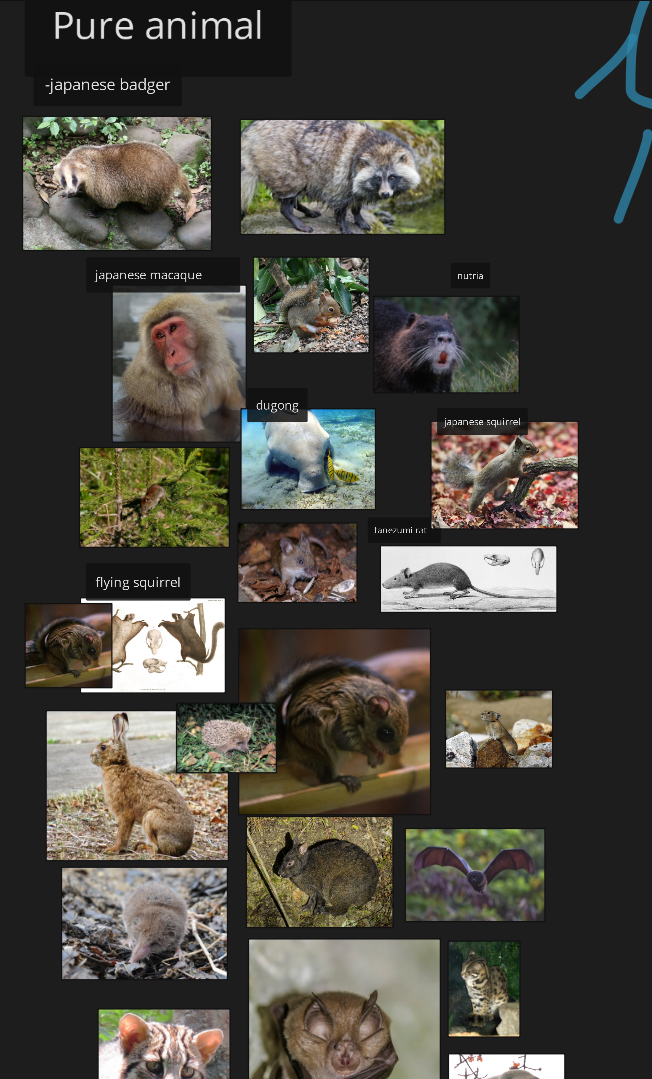
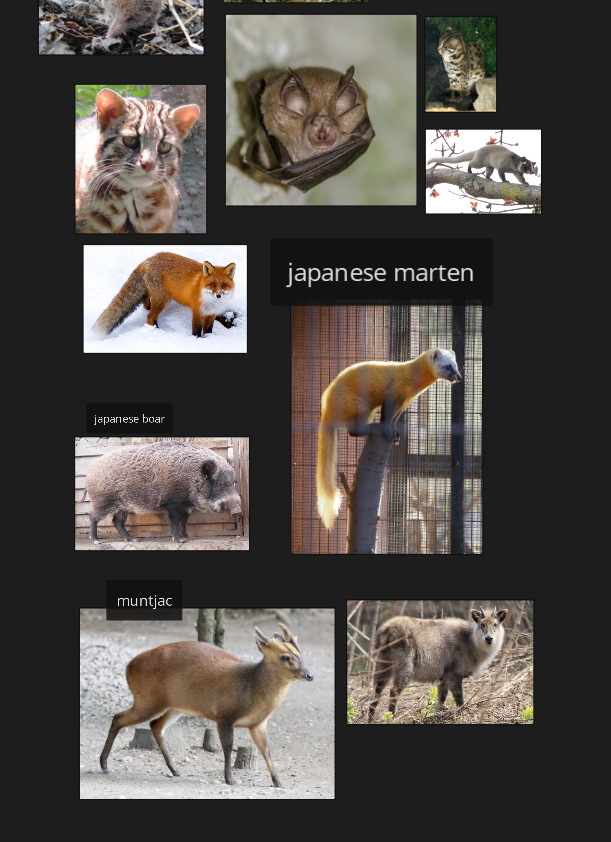
Animals of Japan

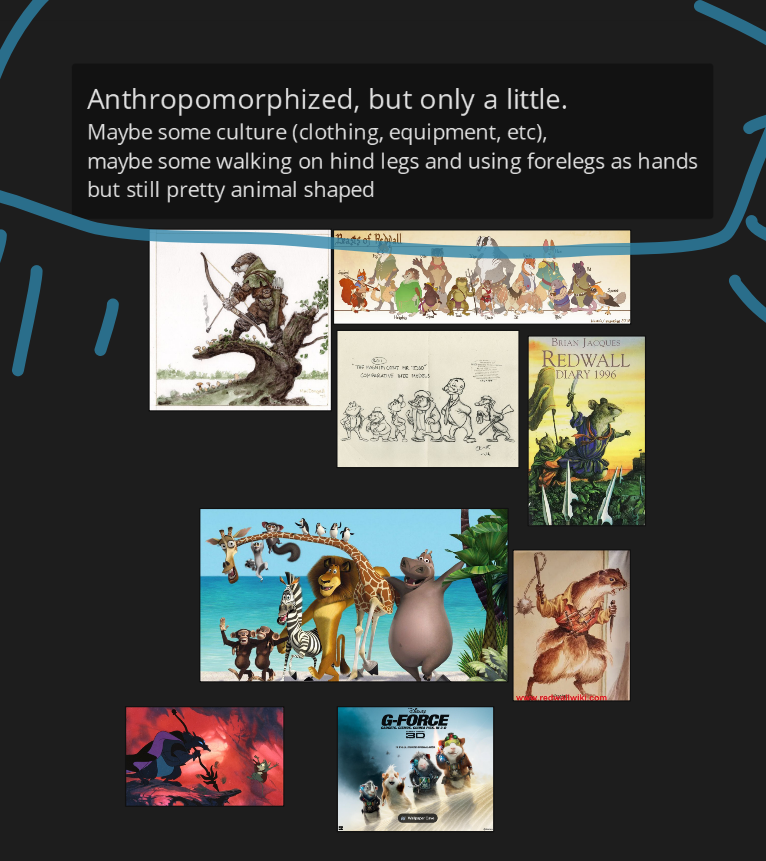
Tanuki implies animals from a similar biome range would be about. Is there a post-human culture here? What are the other animals up to? Is there some sorta Redwall-like society of raccoon dogs, stoats, mice, rats, badgers, feral cats and dogs, rabbits, etc?

[![image.png](https://docs.bugjam.dev/uploads/images/gallery/2026-02/scaled-1680-/KNVimage.png)](https://docs.bugjam.dev/uploads/images/gallery/2026-02/KNVimage.png)
[![image.png](https://docs.bugjam.dev/uploads/images/gallery/2026-02/scaled-1680-/uetimage.png)](https://docs.bugjam.dev/uploads/images/gallery/2026-02/uetimage.png)  
TECH ART NOTES: Within this idea, still a good practice for scope to have a limited number of "template" rigs, AKA a ferret rig that also works on an otter, weasel, etc. Less strain from multiple rigs, less work, rerigging, and most of these guys are in a rough archetype anyway. A rat and a mouse can use the same rig, just make the rat bigger.

#### Robotz

[![image.png](https://docs.bugjam.dev/uploads/images/gallery/2026-02/scaled-1680-/7ykimage.png)](https://docs.bugjam.dev/uploads/images/gallery/2026-02/7ykimage.png)
### Mind Map  


<div class="mxgraph" data-mxgraph="{"highlight":"#0000ff","nav":true,"resize":true,"dark-mode":"auto","toolbar":"zoom layers tags lightbox","edit":"_blank","xml":"<mxfile host=\"app.diagrams.net\" agent=\"Mozilla/5.0 (Windows NT 10.0; Win64; x64) AppleWebKit/537.36 (KHTML, like Gecko) Chrome/144.0.0.0 Safari/537.36 Edg/144.0.0.0\" version=\"29.4.0\">\n  <diagram name=\"Page-1\" id=\"9bGSMOLLo3NzouoYFi-f\">\n    <mxGraphModel dx=\"1887\" dy=\"675\" grid=\"1\" gridSize=\"10\" guides=\"1\" tooltips=\"1\" connect=\"1\" arrows=\"1\" fold=\"1\" page=\"1\" pageScale=\"1\" pageWidth=\"850\" pageHeight=\"1100\" math=\"0\" shadow=\"0\">\n      <root>\n        <mxCell id=\"0\" />\n        <mxCell id=\"1\" parent=\"0\" />\n        <mxCell id=\"NVhUqfEGMMOvzp51ogCg-3\" edge=\"1\" parent=\"1\" source=\"NVhUqfEGMMOvzp51ogCg-1\" style=\"edgeStyle=orthogonalEdgeStyle;rounded=0;orthogonalLoop=1;jettySize=auto;html=1;\" target=\"NVhUqfEGMMOvzp51ogCg-2\" value=\"\">\n          <mxGeometry relative=\"1\" as=\"geometry\" />\n        </mxCell>\n        <mxCell id=\"NVhUqfEGMMOvzp51ogCg-5\" edge=\"1\" parent=\"1\" source=\"NVhUqfEGMMOvzp51ogCg-1\" style=\"edgeStyle=orthogonalEdgeStyle;rounded=0;orthogonalLoop=1;jettySize=auto;html=1;\" target=\"NVhUqfEGMMOvzp51ogCg-4\" value=\"\">\n          <mxGeometry relative=\"1\" as=\"geometry\" />\n        </mxCell>\n        <mxCell id=\"NVhUqfEGMMOvzp51ogCg-7\" edge=\"1\" parent=\"1\" source=\"NVhUqfEGMMOvzp51ogCg-1\" style=\"edgeStyle=orthogonalEdgeStyle;rounded=0;orthogonalLoop=1;jettySize=auto;html=1;\" target=\"NVhUqfEGMMOvzp51ogCg-6\" value=\"\">\n          <mxGeometry relative=\"1\" as=\"geometry\" />\n        </mxCell>\n        <mxCell id=\"NVhUqfEGMMOvzp51ogCg-1\" parent=\"1\" style=\"ellipse;whiteSpace=wrap;html=1;aspect=fixed;\" value=\"&lt;font style=&quot;font-size: 72px;&quot;&gt;Tanuki&lt;/font&gt;&lt;div&gt;&lt;font style=&quot;font-size: 10px;&quot;&gt;you are a tanuki, breaking into a futuristic museum patrolled by robots and security cameras to steal a diamond, you can transform into objects to hide from robots, and use your environment to sneak around. you can move objects to block, or redirect lasers (mirrors), solve puzzles, do some mischief. then you finally steal the diamond and have to make it out without getting caught! if you get caught, you are placed outside and have to try again.&lt;/font&gt;&lt;/div&gt;\" vertex=\"1\">\n          <mxGeometry height=\"310\" width=\"310\" x=\"240\" y=\"340\" as=\"geometry\" />\n        </mxCell>\n        <mxCell id=\"NVhUqfEGMMOvzp51ogCg-9\" edge=\"1\" parent=\"1\" source=\"NVhUqfEGMMOvzp51ogCg-2\" style=\"edgeStyle=orthogonalEdgeStyle;rounded=0;orthogonalLoop=1;jettySize=auto;html=1;\" target=\"NVhUqfEGMMOvzp51ogCg-8\" value=\"\">\n          <mxGeometry relative=\"1\" as=\"geometry\" />\n        </mxCell>\n        <mxCell id=\"NVhUqfEGMMOvzp51ogCg-41\" edge=\"1\" parent=\"1\" source=\"NVhUqfEGMMOvzp51ogCg-2\" style=\"edgeStyle=orthogonalEdgeStyle;rounded=0;orthogonalLoop=1;jettySize=auto;html=1;\" target=\"NVhUqfEGMMOvzp51ogCg-40\" value=\"\">\n          <mxGeometry relative=\"1\" as=\"geometry\" />\n        </mxCell>\n        <mxCell id=\"NVhUqfEGMMOvzp51ogCg-2\" parent=\"1\" style=\"ellipse;whiteSpace=wrap;html=1;\" value=\"&lt;br&gt;&lt;div&gt;&lt;a href=&quot;https://en.wikipedia.org/wiki/Japanese_raccoon_dog&quot;&gt;Japanese raccoon dog - Wikipedia&lt;/a&gt;&lt;/div&gt;&lt;div&gt;&lt;br&gt;&lt;/div&gt;\" vertex=\"1\">\n          <mxGeometry height=\"80\" width=\"80\" x=\"745\" y=\"455\" as=\"geometry\" />\n        </mxCell>\n        <mxCell id=\"NVhUqfEGMMOvzp51ogCg-4\" parent=\"1\" style=\"ellipse;whiteSpace=wrap;html=1;\" value=\"Museums\" vertex=\"1\">\n          <mxGeometry height=\"80\" width=\"80\" x=\"355\" y=\"845\" as=\"geometry\" />\n        </mxCell>\n        <mxCell id=\"NVhUqfEGMMOvzp51ogCg-6\" parent=\"1\" style=\"ellipse;whiteSpace=wrap;html=1;\" value=\"Cyberpunk\" vertex=\"1\">\n          <mxGeometry height=\"80\" width=\"80\" x=\"-35\" y=\"455\" as=\"geometry\" />\n        </mxCell>\n        <mxCell id=\"NVhUqfEGMMOvzp51ogCg-11\" edge=\"1\" parent=\"1\" source=\"NVhUqfEGMMOvzp51ogCg-8\" style=\"edgeStyle=orthogonalEdgeStyle;rounded=0;orthogonalLoop=1;jettySize=auto;html=1;\" target=\"NVhUqfEGMMOvzp51ogCg-10\" value=\"\">\n          <mxGeometry relative=\"1\" as=\"geometry\">\n            <Array as=\"points\">\n              <mxPoint x=\"785\" y=\"720\" />\n              <mxPoint x=\"738\" y=\"720\" />\n            </Array>\n          </mxGeometry>\n        </mxCell>\n        <mxCell id=\"NVhUqfEGMMOvzp51ogCg-13\" edge=\"1\" parent=\"1\" source=\"NVhUqfEGMMOvzp51ogCg-8\" style=\"edgeStyle=orthogonalEdgeStyle;rounded=0;orthogonalLoop=1;jettySize=auto;html=1;\" target=\"NVhUqfEGMMOvzp51ogCg-12\" value=\"\">\n          <mxGeometry relative=\"1\" as=\"geometry\" />\n        </mxCell>\n        <mxCell id=\"NVhUqfEGMMOvzp51ogCg-15\" edge=\"1\" parent=\"1\" source=\"NVhUqfEGMMOvzp51ogCg-8\" style=\"edgeStyle=orthogonalEdgeStyle;rounded=0;orthogonalLoop=1;jettySize=auto;html=1;\" target=\"NVhUqfEGMMOvzp51ogCg-14\" value=\"\">\n          <mxGeometry relative=\"1\" as=\"geometry\" />\n        </mxCell>\n        <mxCell id=\"NVhUqfEGMMOvzp51ogCg-8\" parent=\"1\" style=\"ellipse;whiteSpace=wrap;html=1;\" value=\"Urban environment animals\" vertex=\"1\">\n          <mxGeometry height=\"80\" width=\"80\" x=\"745\" y=\"615\" as=\"geometry\" />\n        </mxCell>\n        <mxCell id=\"NVhUqfEGMMOvzp51ogCg-22\" edge=\"1\" parent=\"1\" source=\"NVhUqfEGMMOvzp51ogCg-10\" style=\"edgeStyle=orthogonalEdgeStyle;rounded=0;orthogonalLoop=1;jettySize=auto;html=1;\" target=\"NVhUqfEGMMOvzp51ogCg-21\" value=\"\">\n          <mxGeometry relative=\"1\" as=\"geometry\" />\n        </mxCell>\n        <mxCell id=\"NVhUqfEGMMOvzp51ogCg-24\" edge=\"1\" parent=\"1\" source=\"NVhUqfEGMMOvzp51ogCg-10\" style=\"edgeStyle=orthogonalEdgeStyle;rounded=0;orthogonalLoop=1;jettySize=auto;html=1;\" target=\"NVhUqfEGMMOvzp51ogCg-23\" value=\"\">\n          <mxGeometry relative=\"1\" as=\"geometry\" />\n        </mxCell>\n        <mxCell id=\"NVhUqfEGMMOvzp51ogCg-28\" edge=\"1\" parent=\"1\" source=\"NVhUqfEGMMOvzp51ogCg-10\" style=\"edgeStyle=orthogonalEdgeStyle;rounded=0;orthogonalLoop=1;jettySize=auto;html=1;\" target=\"NVhUqfEGMMOvzp51ogCg-26\" value=\"\">\n          <mxGeometry relative=\"1\" as=\"geometry\">\n            <Array as=\"points\">\n              <mxPoint x=\"710\" y=\"800\" />\n              <mxPoint x=\"690\" y=\"800\" />\n              <mxPoint x=\"690\" y=\"810\" />\n              <mxPoint x=\"682\" y=\"810\" />\n            </Array>\n          </mxGeometry>\n        </mxCell>\n        <mxCell id=\"NVhUqfEGMMOvzp51ogCg-31\" edge=\"1\" parent=\"1\" source=\"NVhUqfEGMMOvzp51ogCg-10\" style=\"edgeStyle=orthogonalEdgeStyle;rounded=0;orthogonalLoop=1;jettySize=auto;html=1;entryX=0;entryY=0.5;entryDx=0;entryDy=0;\" target=\"NVhUqfEGMMOvzp51ogCg-30\">\n          <mxGeometry relative=\"1\" as=\"geometry\">\n            <Array as=\"points\">\n              <mxPoint x=\"750\" y=\"825\" />\n            </Array>\n          </mxGeometry>\n        </mxCell>\n        <mxCell id=\"NVhUqfEGMMOvzp51ogCg-10\" parent=\"1\" style=\"ellipse;whiteSpace=wrap;html=1;\" value=\"&lt;div&gt;Mammals&lt;/div&gt;\" vertex=\"1\">\n          <mxGeometry height=\"50\" width=\"55\" x=\"710\" y=\"740\" as=\"geometry\" />\n        </mxCell>\n        <mxCell id=\"NVhUqfEGMMOvzp51ogCg-34\" edge=\"1\" parent=\"1\" source=\"NVhUqfEGMMOvzp51ogCg-12\" style=\"edgeStyle=orthogonalEdgeStyle;rounded=0;orthogonalLoop=1;jettySize=auto;html=1;\" target=\"NVhUqfEGMMOvzp51ogCg-33\" value=\"\">\n          <mxGeometry relative=\"1\" as=\"geometry\" />\n        </mxCell>\n        <mxCell id=\"NVhUqfEGMMOvzp51ogCg-36\" edge=\"1\" parent=\"1\" source=\"NVhUqfEGMMOvzp51ogCg-12\" style=\"edgeStyle=orthogonalEdgeStyle;rounded=0;orthogonalLoop=1;jettySize=auto;html=1;\">\n          <mxGeometry relative=\"1\" as=\"geometry\">\n            <mxPoint x=\"550\" y=\"680\" as=\"targetPoint\" />\n          </mxGeometry>\n        </mxCell>\n        <mxCell id=\"NVhUqfEGMMOvzp51ogCg-12\" parent=\"1\" style=\"ellipse;whiteSpace=wrap;html=1;\" value=\"Birds\" vertex=\"1\">\n          <mxGeometry height=\"80\" width=\"80\" x=\"585\" y=\"615\" as=\"geometry\" />\n        </mxCell>\n        <mxCell id=\"NVhUqfEGMMOvzp51ogCg-14\" parent=\"1\" style=\"ellipse;whiteSpace=wrap;html=1;\" value=\"bugs\" vertex=\"1\">\n          <mxGeometry height=\"80\" width=\"80\" x=\"905\" y=\"615\" as=\"geometry\" />\n        </mxCell>\n        <mxCell id=\"NVhUqfEGMMOvzp51ogCg-21\" parent=\"1\" style=\"ellipse;whiteSpace=wrap;html=1;\" value=\"Rats\" vertex=\"1\">\n          <mxGeometry height=\"60\" width=\"100\" x=\"820\" y=\"730\" as=\"geometry\" />\n        </mxCell>\n        <mxCell id=\"NVhUqfEGMMOvzp51ogCg-23\" parent=\"1\" style=\"ellipse;whiteSpace=wrap;html=1;\" value=\"Bunnies\" vertex=\"1\">\n          <mxGeometry height=\"80\" width=\"80\" x=\"562.5\" y=\"720\" as=\"geometry\" />\n        </mxCell>\n        <mxCell id=\"NVhUqfEGMMOvzp51ogCg-26\" parent=\"1\" style=\"ellipse;whiteSpace=wrap;html=1;\" value=\"Racoons\" vertex=\"1\">\n          <mxGeometry height=\"30\" width=\"80\" x=\"642.5\" y=\"815\" as=\"geometry\" />\n        </mxCell>\n        <mxCell id=\"NVhUqfEGMMOvzp51ogCg-30\" parent=\"1\" style=\"ellipse;whiteSpace=wrap;html=1;\" value=\"Dogs\" vertex=\"1\">\n          <mxGeometry height=\"30\" width=\"60\" x=\"770\" y=\"810\" as=\"geometry\" />\n        </mxCell>\n        <mxCell id=\"NVhUqfEGMMOvzp51ogCg-32\" parent=\"1\" style=\"ellipse;whiteSpace=wrap;html=1;\" value=\"cats\" vertex=\"1\">\n          <mxGeometry height=\"30\" width=\"60\" x=\"722.5\" y=\"850\" as=\"geometry\" />\n        </mxCell>\n        <mxCell id=\"NVhUqfEGMMOvzp51ogCg-33\" parent=\"1\" style=\"ellipse;whiteSpace=wrap;html=1;\" value=\"Crows\" vertex=\"1\">\n          <mxGeometry height=\"20\" width=\"70\" x=\"620\" y=\"580\" as=\"geometry\" />\n        </mxCell>\n        <mxCell id=\"NVhUqfEGMMOvzp51ogCg-39\" parent=\"1\" style=\"ellipse;whiteSpace=wrap;html=1;\" value=\"Seagulls\" vertex=\"1\">\n          <mxGeometry height=\"20\" width=\"70\" x=\"480\" y=\"670\" as=\"geometry\" />\n        </mxCell>\n        <mxCell id=\"NVhUqfEGMMOvzp51ogCg-40\" parent=\"1\" style=\"ellipse;whiteSpace=wrap;html=1;\" value=\"Trash pandas\" vertex=\"1\">\n          <mxGeometry height=\"45\" width=\"95\" x=\"745\" y=\"330\" as=\"geometry\" />\n        </mxCell>\n      </root>\n    </mxGraphModel>\n  </diagram>\n</mxfile>\n"}" id="bkmrk--16" style="max-width: 100%; border: 1px solid transparent;">  
</div>[Feel free to add to it! ](https://drive.google.com/file/d/1B2wOg1ayBR3sQDH0jU8M45vqwOCyQmpF/view?usp=sharing)  
Mind maps are a useful way to get a word salad of helpful ideas to moodboard. No wrong answers--more words = better! "If you know the name of something and you have the internet, there is zero excuse to not have reference," a concept artist said once. --Oscar

# Gray boxing levels with Godot's CSG nodes

## What is CSG?

CSG stands for **Constructive Solid Geometry.** Godot has a built-in CSG system that's *great* for quickly prototyping and grayboxing levels or any other mesh.

If you're used to Blender, think of it like adding a ton of meshes together with the [**Boolean Modifier**](https://docs.blender.org/manual/en/latest/modeling/modifiers/generate/booleans.html) but a lot quicker to iterate on.

There is a page for this in the Godot docs, but it is a little bare-bones and does not go over the export process very well:

[https://docs.godotengine.org/en/stable/tutorials/3d/csg\_tools.html](https://docs.godotengine.org/en/stable/tutorials/3d/csg_tools.html)

It is good to give 👆 a read before continuing on this page!

## Creating CSG levels

### Adding the CSGCombiner3D

First, you will want to create a root [CSGCombiner3D](https://docs.godotengine.org/en/stable/classes/class_csgcombiner3d.html) node. This node will combine all of the CSG nodes underneath it into one big mesh.

Make sure that you also turn **Use Collision** on. This will also create a **static** collision body as part of the CSG node - important for level geometry!

[![Screenshot 2026-02-15 at 5.04.27 PM.png](https://docs.bugjam.dev/uploads/images/gallery/2026-02/scaled-1680-/screenshot-2026-02-15-at-5-04-27-pm.png)](https://docs.bugjam.dev/uploads/images/gallery/2026-02/screenshot-2026-02-15-at-5-04-27-pm.png)

You will also want to add a **Material Override** to the CSG combiner. This material will automatically be used for the generated geometry.

[Kenney's Prototype Textures](https://www.kenney.nl/assets/prototype-textures) pack is very useful here!

[![Screenshot 2026-02-15 at 5.12.31 PM.png](https://docs.bugjam.dev/uploads/images/gallery/2026-02/scaled-1680-/screenshot-2026-02-15-at-5-12-31-pm.png)](https://docs.bugjam.dev/uploads/images/gallery/2026-02/screenshot-2026-02-15-at-5-12-31-pm.png)

Inside of the material, make sure you turn on **UV1 →** **Triplanar**. This will make the texture repeat over the final geometry. You can also change the **UV1** → **Scale** to change how the texture repeats. Higher numbers means it will repeat more.

[![Screenshot 2026-02-15 at 5.13.50 PM.png](https://docs.bugjam.dev/uploads/images/gallery/2026-02/scaled-1680-/screenshot-2026-02-15-at-5-13-50-pm.png)](https://docs.bugjam.dev/uploads/images/gallery/2026-02/screenshot-2026-02-15-at-5-13-50-pm.png)

*Side note: if we're doing this a lot, we should probably just have a material that is saved to a resource to use for this.*

### Adding CSG nodes

As children of the `CSGCombiner3D` , you can add any of the CSG nodes:

- [<span class="std std-ref">CSGBox3D</span>](https://docs.godotengine.org/en/stable/classes/class_csgbox3d.html#class-csgbox3d)
- [<span class="std std-ref">CSGCylinder3D</span>](https://docs.godotengine.org/en/stable/classes/class_csgcylinder3d.html#class-csgcylinder3d) (also supports cone)
- [<span class="std std-ref">CSGSphere3D</span>](https://docs.godotengine.org/en/stable/classes/class_csgsphere3d.html#class-csgsphere3d)
- [<span class="std std-ref">CSGTorus3D</span>](https://docs.godotengine.org/en/stable/classes/class_csgtorus3d.html#class-csgtorus3d)
- [<span class="std std-ref">CSGPolygon3D</span>](https://docs.godotengine.org/en/stable/classes/class_csgpolygon3d.html#class-csgpolygon3d)
- [<span class="std std-ref">CSGMesh3D</span>](https://docs.godotengine.org/en/stable/classes/class_csgmesh3d.html#class-csgmesh3d)
- [<span class="std std-ref">CSGCombiner3D</span>](https://docs.godotengine.org/en/stable/classes/class_csgcombiner3d.html#class-csgcombiner3d)

[![csg_mesh.webp](https://docs.bugjam.dev/uploads/images/gallery/2026-02/scaled-1680-/csg-mesh.webp)](https://docs.bugjam.dev/uploads/images/gallery/2026-02/csg-mesh.webp)

Note that for each node, you can also set its **Operation**, this can be used to i.e. make holes in a mesh:

[![Screenshot 2026-02-15 at 5.10.06 PM.png](https://docs.bugjam.dev/uploads/images/gallery/2026-02/scaled-1680-/screenshot-2026-02-15-at-5-10-06-pm.png)](https://docs.bugjam.dev/uploads/images/gallery/2026-02/screenshot-2026-02-15-at-5-10-06-pm.png)

[![image.png](https://docs.bugjam.dev/uploads/images/gallery/2026-02/scaled-1680-/pS0image.png)](https://docs.bugjam.dev/uploads/images/gallery/2026-02/pS0image.png)

### Making rooms

#### Method 1: Flip faces

As noted in the "[Prototyping levels with CSG](https://docs.godotengine.org/en/stable/tutorials/3d/csg_tools.html)" page in the Godot docs, there is a "**Flip** **Faces**" toggle for CSG primitives. Turning this on will create a sort of "inverted box" that you can go inside of:

[![Screenshot 2026-02-15 at 5.20.19 PM.png](https://docs.bugjam.dev/uploads/images/gallery/2026-02/scaled-1680-/screenshot-2026-02-15-at-5-20-19-pm.png)](https://docs.bugjam.dev/uploads/images/gallery/2026-02/screenshot-2026-02-15-at-5-20-19-pm.png)

*However*, this has some problems when used for level geometry:

- You cannot easily poke a hole in the box for i.e. a door
- The walls have no width to them, which can lead to physics objects clipping through them easily

#### Method 2: Double primitives with subtraction

You can also create two of the same CSG primitives, shrink one down by a bit, and then set the "**Operation**" of the smaller one to "**Subtraction**".

Here, I have two boxes. The outer one has a size of `(10, 10, 10)` and the inner one has a size of `(9.5, 9.5, 9.5)`

[![Screenshot 2026-02-15 at 5.26.41 PM.png](https://docs.bugjam.dev/uploads/images/gallery/2026-02/scaled-1680-/screenshot-2026-02-15-at-5-26-41-pm.png)](https://docs.bugjam.dev/uploads/images/gallery/2026-02/screenshot-2026-02-15-at-5-26-41-pm.png)

This leaves you with a hollow box with nice, thick walls. Walls that are ~0.5 units thick are nice since they make it easy to hide overlapping geometry if you have anu.

To something like a door, you can add another node with subtraction:

[![Screenshot 2026-02-15 at 5.28.23 PM.png](https://docs.bugjam.dev/uploads/images/gallery/2026-02/scaled-1680-/screenshot-2026-02-15-at-5-28-23-pm.png)](https://docs.bugjam.dev/uploads/images/gallery/2026-02/screenshot-2026-02-15-at-5-28-23-pm.png)

[![Screenshot 2026-02-15 at 5.29.08 PM.png](https://docs.bugjam.dev/uploads/images/gallery/2026-02/scaled-1680-/screenshot-2026-02-15-at-5-29-08-pm.png)](https://docs.bugjam.dev/uploads/images/gallery/2026-02/screenshot-2026-02-15-at-5-29-08-pm.png)

You can also add things like windows:

[![Screenshot 2026-02-15 at 5.32.22 PM.png](https://docs.bugjam.dev/uploads/images/gallery/2026-02/scaled-1680-/screenshot-2026-02-15-at-5-32-22-pm.png)](https://docs.bugjam.dev/uploads/images/gallery/2026-02/screenshot-2026-02-15-at-5-32-22-pm.png)

### Making ramps and multiple levels

Ramps can be made by adding a box and, rotating it by 30deg on the Z axis, and then positioning it against another box.

You can make the ramp taller so that there isn't any space underneath it. Getting these lined up exactly can be tricky, but in general character controllers are able to deal with small gaps/hitches and it can be cleaned up in Blender.

[![Screenshot 2026-02-15 at 5.41.41 PM.png](https://docs.bugjam.dev/uploads/images/gallery/2026-02/scaled-1680-/screenshot-2026-02-15-at-5-41-41-pm.png)](https://docs.bugjam.dev/uploads/images/gallery/2026-02/screenshot-2026-02-15-at-5-41-41-pm.png)

[![Screenshot 2026-02-15 at 5.42.47 PM.png](https://docs.bugjam.dev/uploads/images/gallery/2026-02/scaled-1680-/screenshot-2026-02-15-at-5-42-47-pm.png)](https://docs.bugjam.dev/uploads/images/gallery/2026-02/screenshot-2026-02-15-at-5-42-47-pm.png)

However, making the ramp tall enough to not have space underneath it, it will poke out of the bottom of whatever it's on:

[![Screenshot 2026-02-15 at 5.44.43 PM.png](https://docs.bugjam.dev/uploads/images/gallery/2026-02/scaled-1680-/screenshot-2026-02-15-at-5-44-43-pm.png)](https://docs.bugjam.dev/uploads/images/gallery/2026-02/screenshot-2026-02-15-at-5-44-43-pm.png)

This can be remedies with another subtraction node that goes a bit into the floor. Again, this is why thicker walls are nice - you can hide these seams inside of them!

[![Screenshot 2026-02-15 at 5.45.22 PM.png](https://docs.bugjam.dev/uploads/images/gallery/2026-02/scaled-1680-/screenshot-2026-02-15-at-5-45-22-pm.png)](https://docs.bugjam.dev/uploads/images/gallery/2026-02/screenshot-2026-02-15-at-5-45-22-pm.png)

### Rapid iteration

At this point, you should be able to drop the player node into the scene, play it, and then move around inside of it.

Super power here is that *you can edit the CSG nodes as the game is running* which means you can change things on the fly to see how they behave!

### Some tips

- In one scene, you can use multiple `CSGCombiner3D` nodes. 
    - It's a good idea to keep things separated in this way, for example having the "shell" of a room be one combiner and having each "section" of it (floors, inner rooms, etc) be separate combiners
    - When using multiple combiners, try to keep the origin of the combiner at or near the actual geometry being created. This makes it easier to move things around later.
- **Order matters** in the combining! 
    - Sometimes if you try to move things around, it will mess with the operations
- **Name nodes as you go** to keep sanity 
    - In the moment, having `CSGBox3D33`, `CSGBox3D45`, `CSGBox3D13` is fine but if you ever have to go back and touch them up later you're in for a world of pain
- Add an `OmniLight3D` inside of the scene to see things better as you go

## Exporting CSG to Blender

### Export glTF from Godot

Godot has a native scene glRF exporter built-in that can do this.

<p class="callout warning">**This is a one-way conversion!!!**  
That means that you should be *pretty sure* that your CSG layout is how you want it before exporting it from Godot.  
Depending on the changes you want to make, it could be easy or difficult to port them back and forth.</p>

It lives under **Scene** **→** **Export As... → glTS 2.0 Scene...**

[![Screenshot 2026-02-15 at 5.51.13 PM.png](https://docs.bugjam.dev/uploads/images/gallery/2026-02/scaled-1680-/screenshot-2026-02-15-at-5-51-13-pm.png)](https://docs.bugjam.dev/uploads/images/gallery/2026-02/screenshot-2026-02-15-at-5-51-13-pm.png)
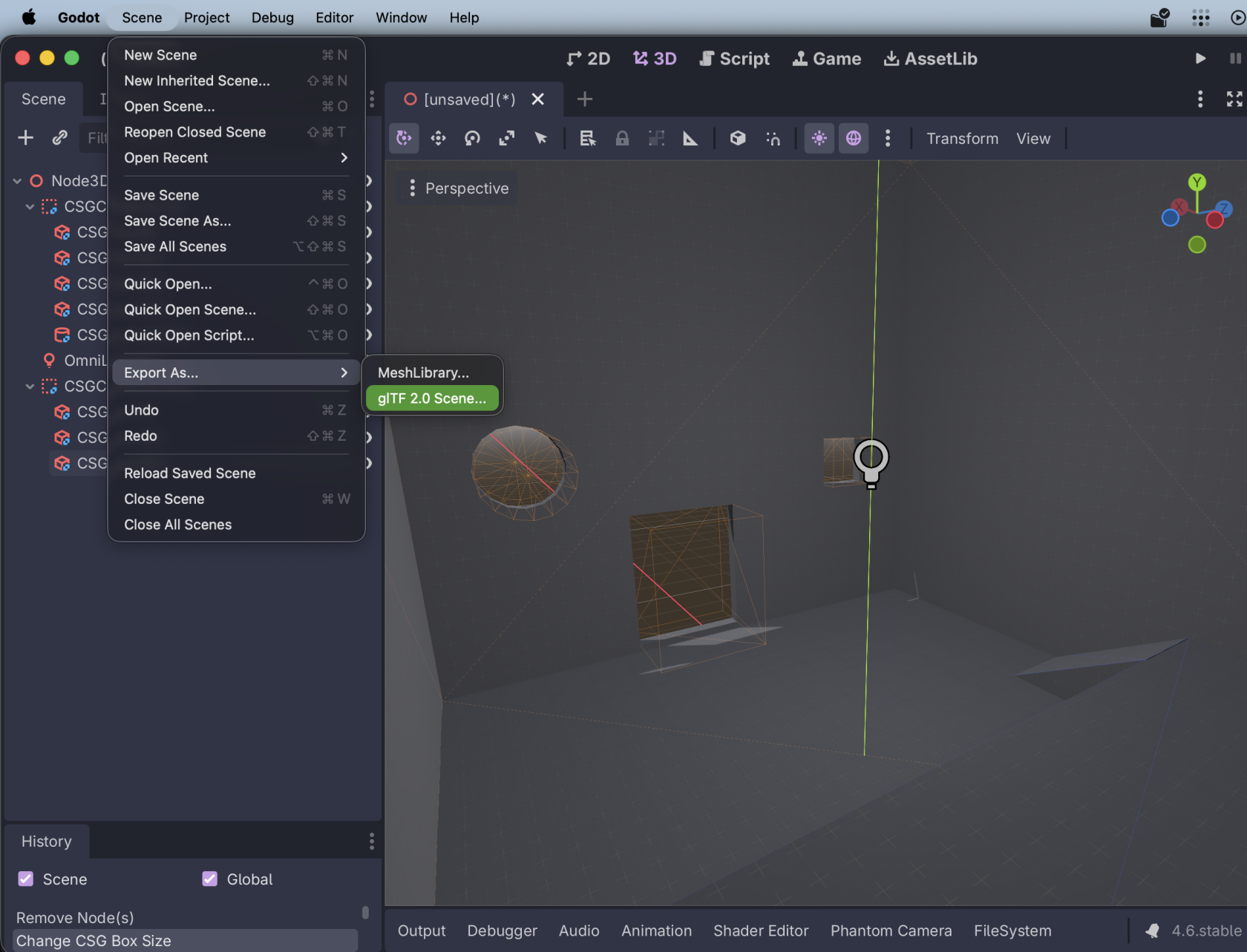
The settings you choose here don't *really* matter:

[![Screenshot 2026-02-15 at 6.01.17 PM.png](https://docs.bugjam.dev/uploads/images/gallery/2026-02/scaled-1680-/screenshot-2026-02-15-at-6-01-17-pm.png)](https://docs.bugjam.dev/uploads/images/gallery/2026-02/screenshot-2026-02-15-at-6-01-17-pm.png)
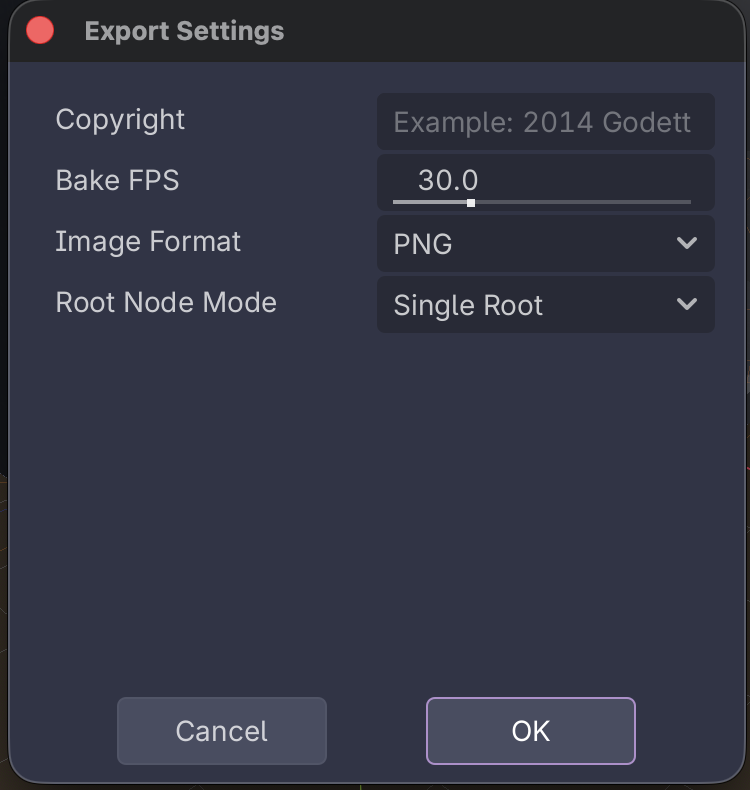
You will then be prompted for where to save the scene.

### Import glTF to Blender

Over in Blender, create a new file and sacrifice the default cube 🔪🧊

Then, go to **File → Import → glTF 2.0 (.glb/.gltf)**

[![Screenshot 2026-02-15 at 6.05.48 PM.png](https://docs.bugjam.dev/uploads/images/gallery/2026-02/scaled-1680-/screenshot-2026-02-15-at-6-05-48-pm.png)](https://docs.bugjam.dev/uploads/images/gallery/2026-02/screenshot-2026-02-15-at-6-05-48-pm.png)
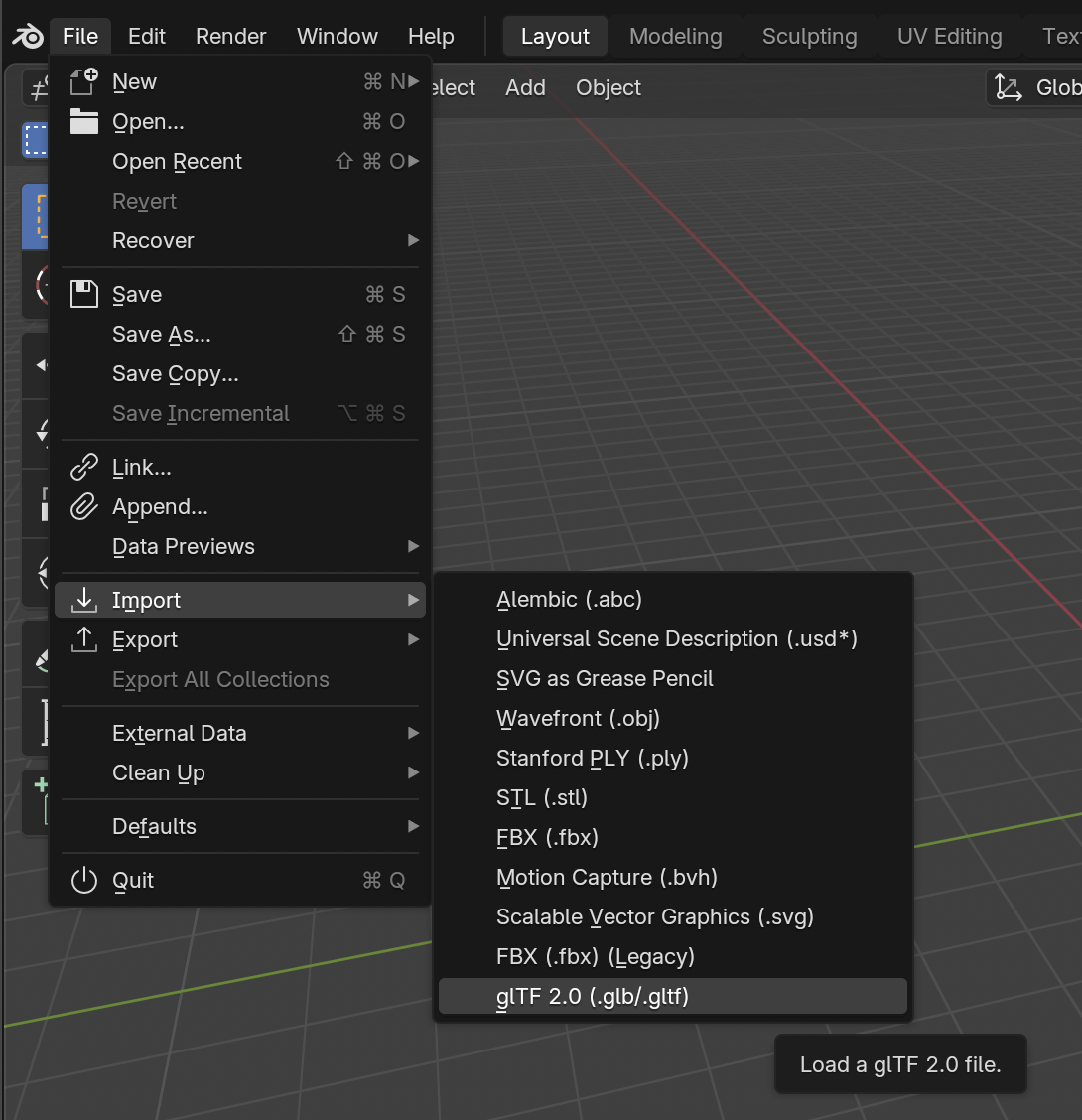
After importing, you'll see your CSG mesh

[![Screenshot 2026-02-15 at 6.52.15 PM.png](https://docs.bugjam.dev/uploads/images/gallery/2026-02/scaled-1680-/screenshot-2026-02-15-at-6-52-15-pm.png)](https://docs.bugjam.dev/uploads/images/gallery/2026-02/screenshot-2026-02-15-at-6-52-15-pm.png)
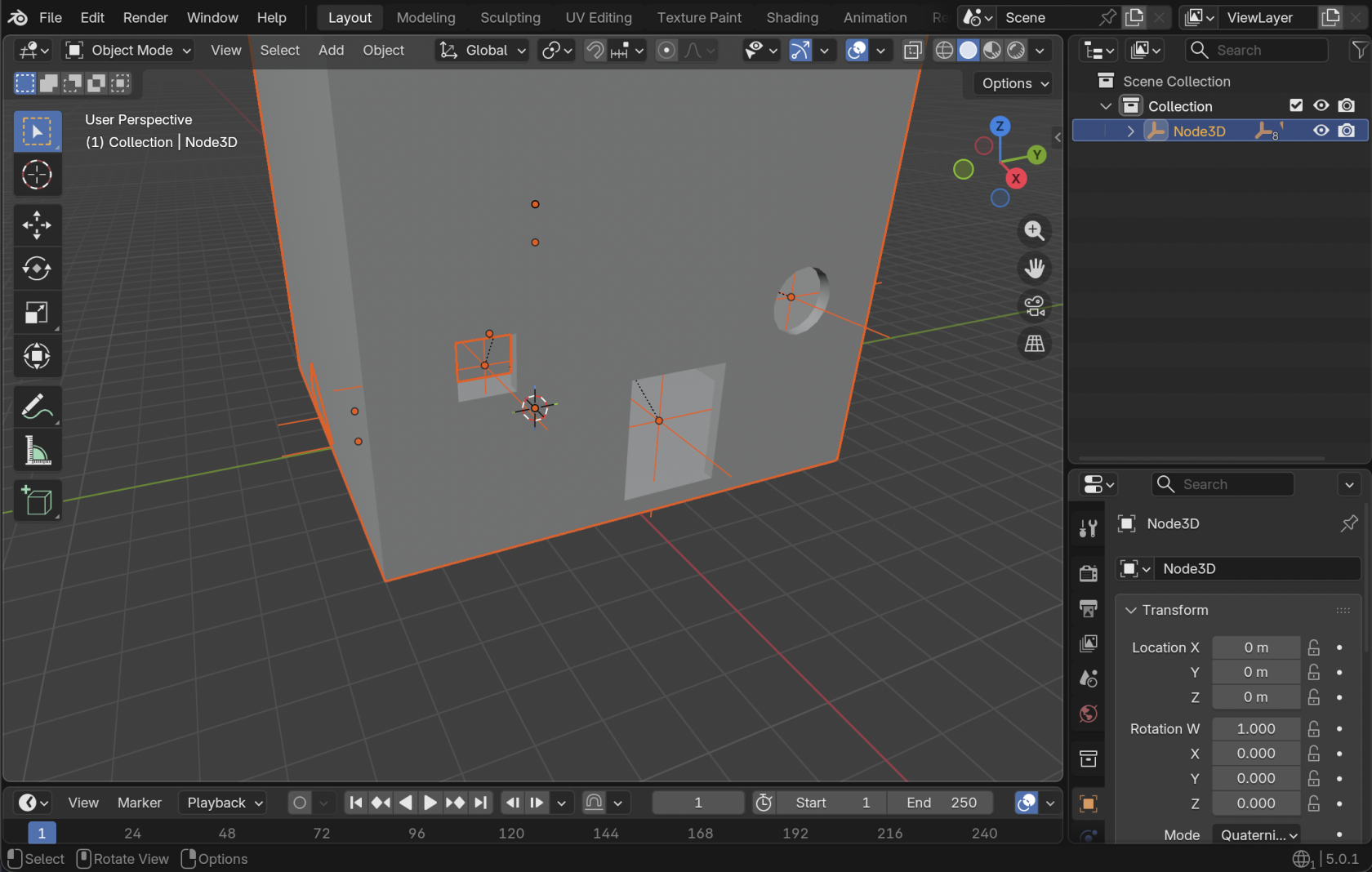
Note that materials, lights, etc. that were in the scene get imported as well! Delete anything you don't want.

[![Screenshot 2026-02-15 at 6.54.09 PM.png](https://docs.bugjam.dev/uploads/images/gallery/2026-02/scaled-1680-/screenshot-2026-02-15-at-6-54-09-pm.png)](https://docs.bugjam.dev/uploads/images/gallery/2026-02/screenshot-2026-02-15-at-6-54-09-pm.png)
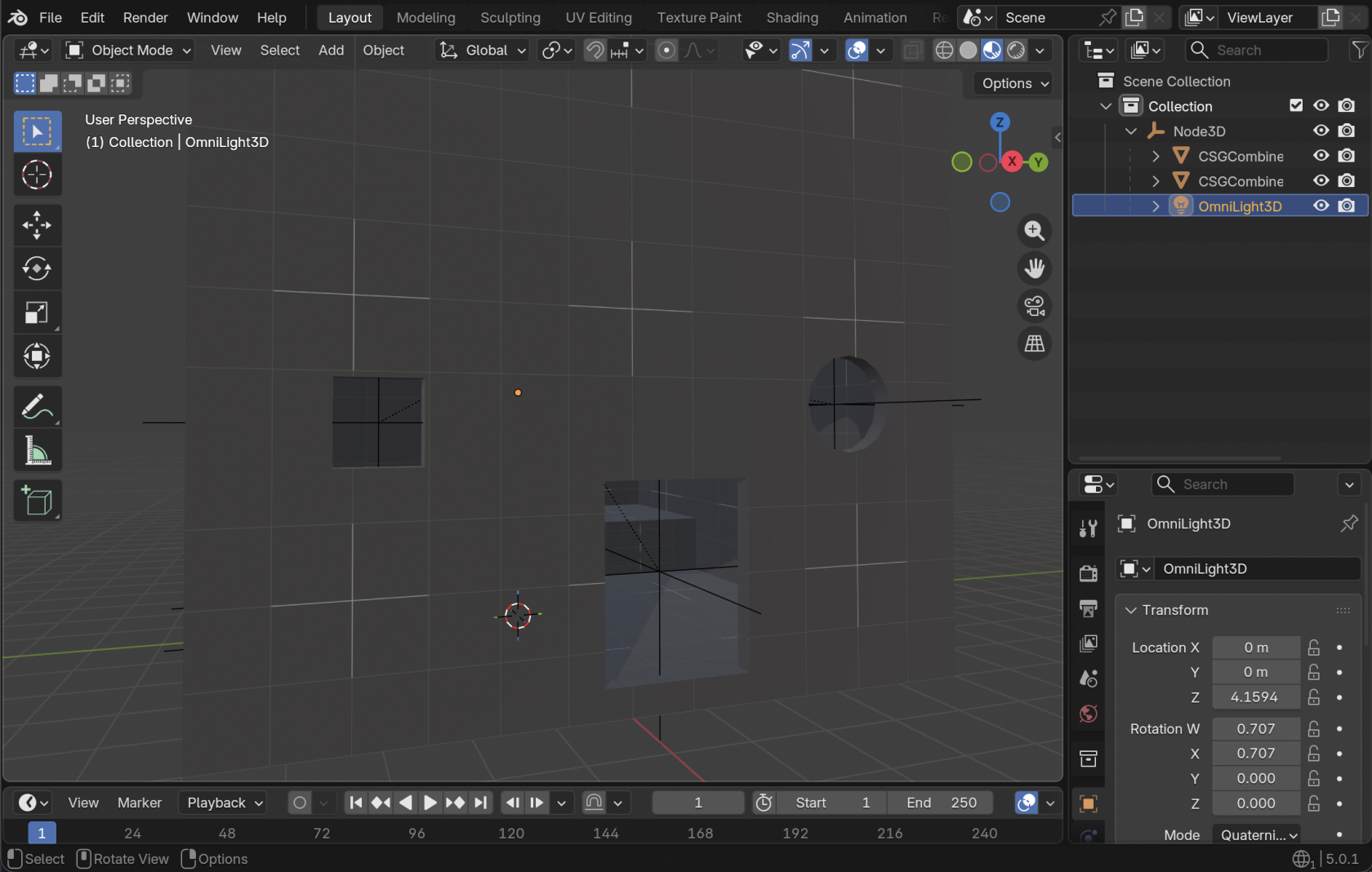
#### Cleaning up the imported glTF

Note that for each CSG node that you added, there will be an "**Empty**" object. You can delete these.

[![Screenshot 2026-02-15 at 6.55.24 PM.png](https://docs.bugjam.dev/uploads/images/gallery/2026-02/scaled-1680-/screenshot-2026-02-15-at-6-55-24-pm.png)](https://docs.bugjam.dev/uploads/images/gallery/2026-02/screenshot-2026-02-15-at-6-55-24-pm.png)
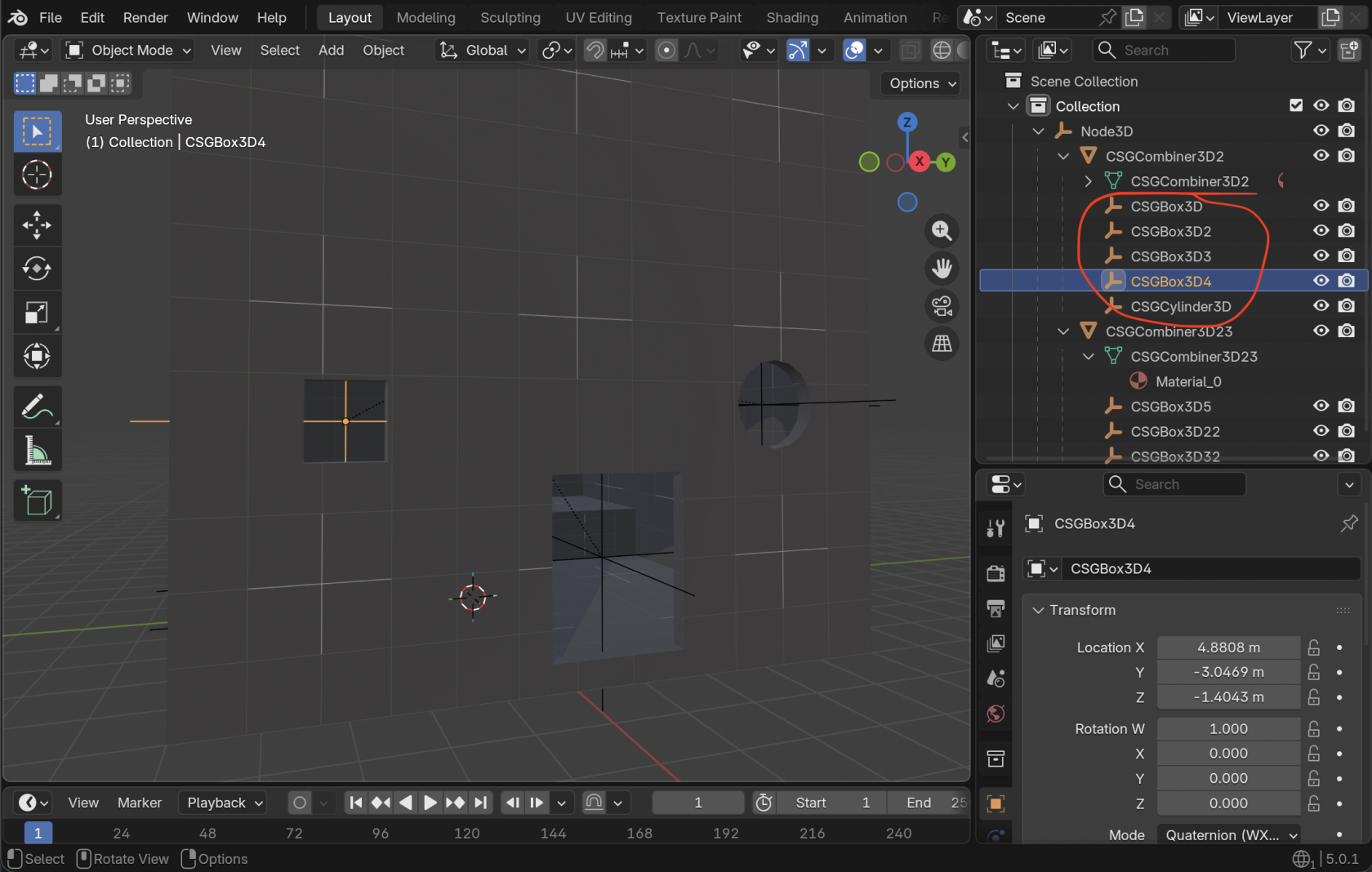
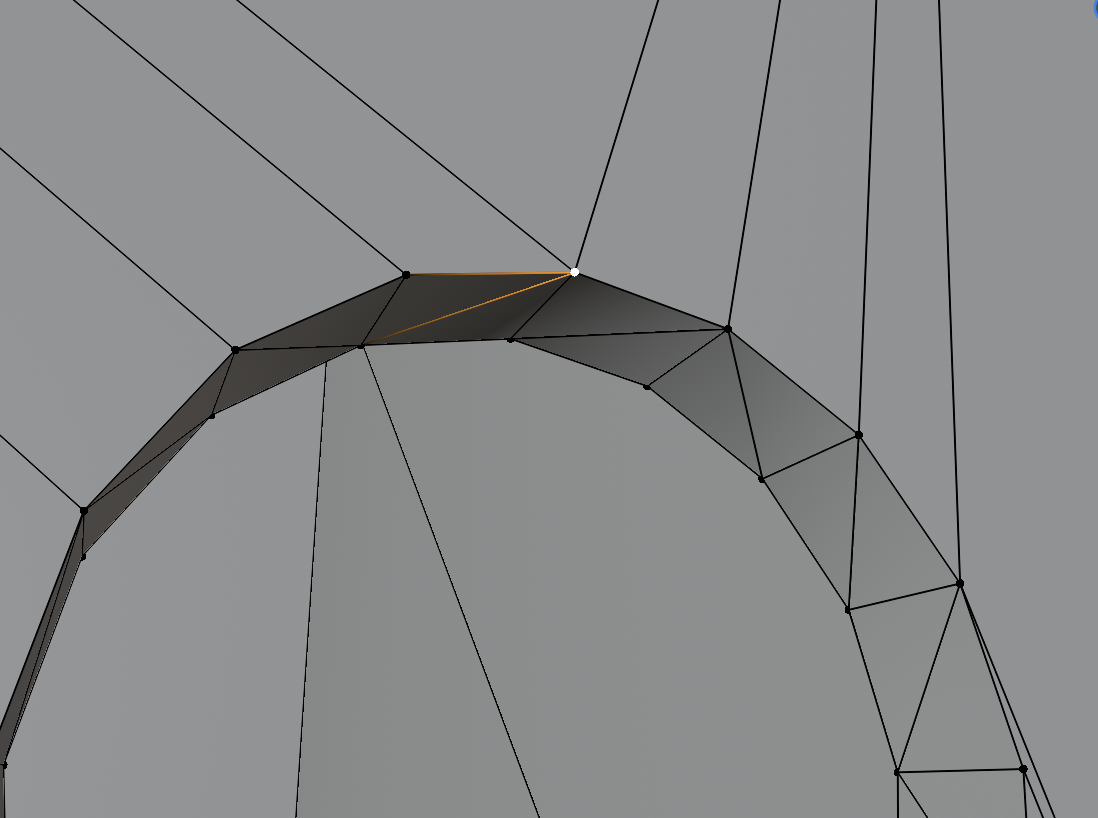
Also **very** important here, *none of the vertices are connected* in the exported mesh! As an example, check out this one vertex that is actually 5 vertices together 😭

[![Screenshot 2026-02-15 at 6.59.17 PM.png](https://docs.bugjam.dev/uploads/images/gallery/2026-02/scaled-1680-/screenshot-2026-02-15-at-6-59-17-pm.png)](https://docs.bugjam.dev/uploads/images/gallery/2026-02/screenshot-2026-02-15-at-6-59-17-pm.png)
[![Screenshot 2026-02-15 at 6.59.59 PM.png](https://docs.bugjam.dev/uploads/images/gallery/2026-02/scaled-1680-/screenshot-2026-02-15-at-6-59-59-pm.png)](https://docs.bugjam.dev/uploads/images/gallery/2026-02/screenshot-2026-02-15-at-6-59-59-pm.png)
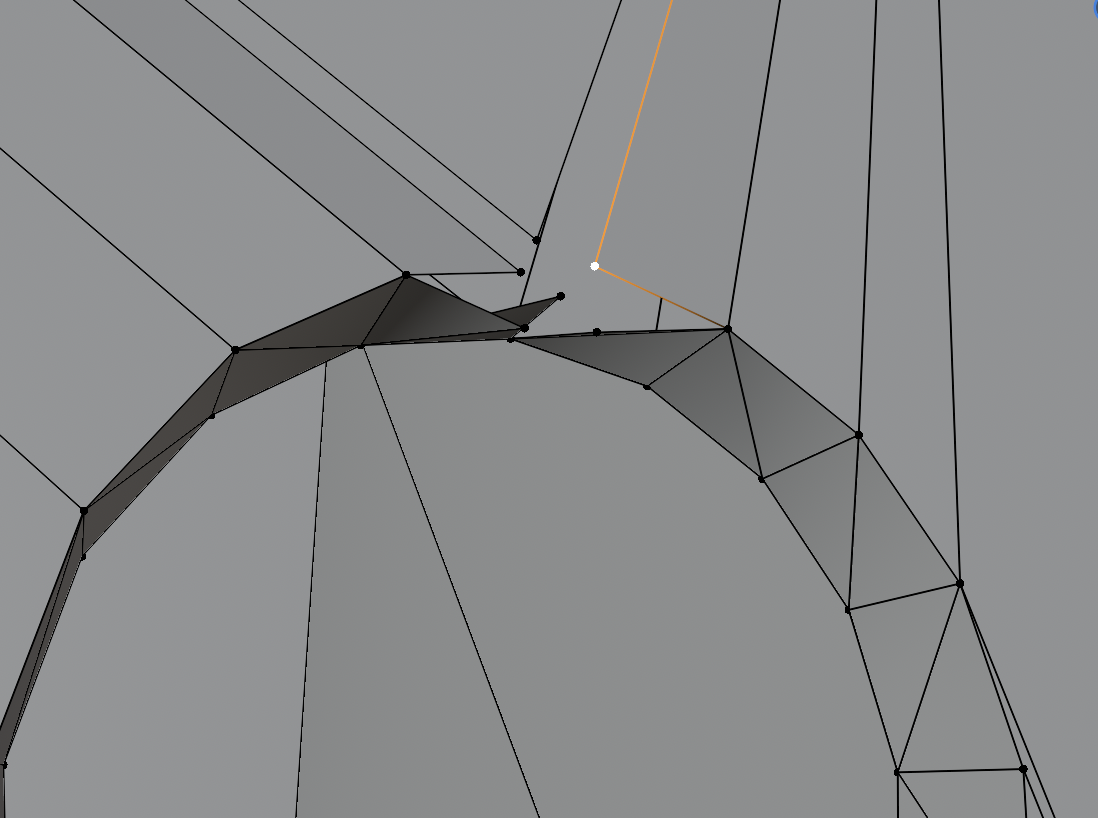
To fix this **hit "A" on your keyboard to select all vertices**, then go to **Mesh → Clean Up → Merge by Distance**

[![Screenshot 2026-02-15 at 7.01.30 PM.png](https://docs.bugjam.dev/uploads/images/gallery/2026-02/scaled-1680-/screenshot-2026-02-15-at-7-01-30-pm.png)](https://docs.bugjam.dev/uploads/images/gallery/2026-02/screenshot-2026-02-15-at-7-01-30-pm.png)
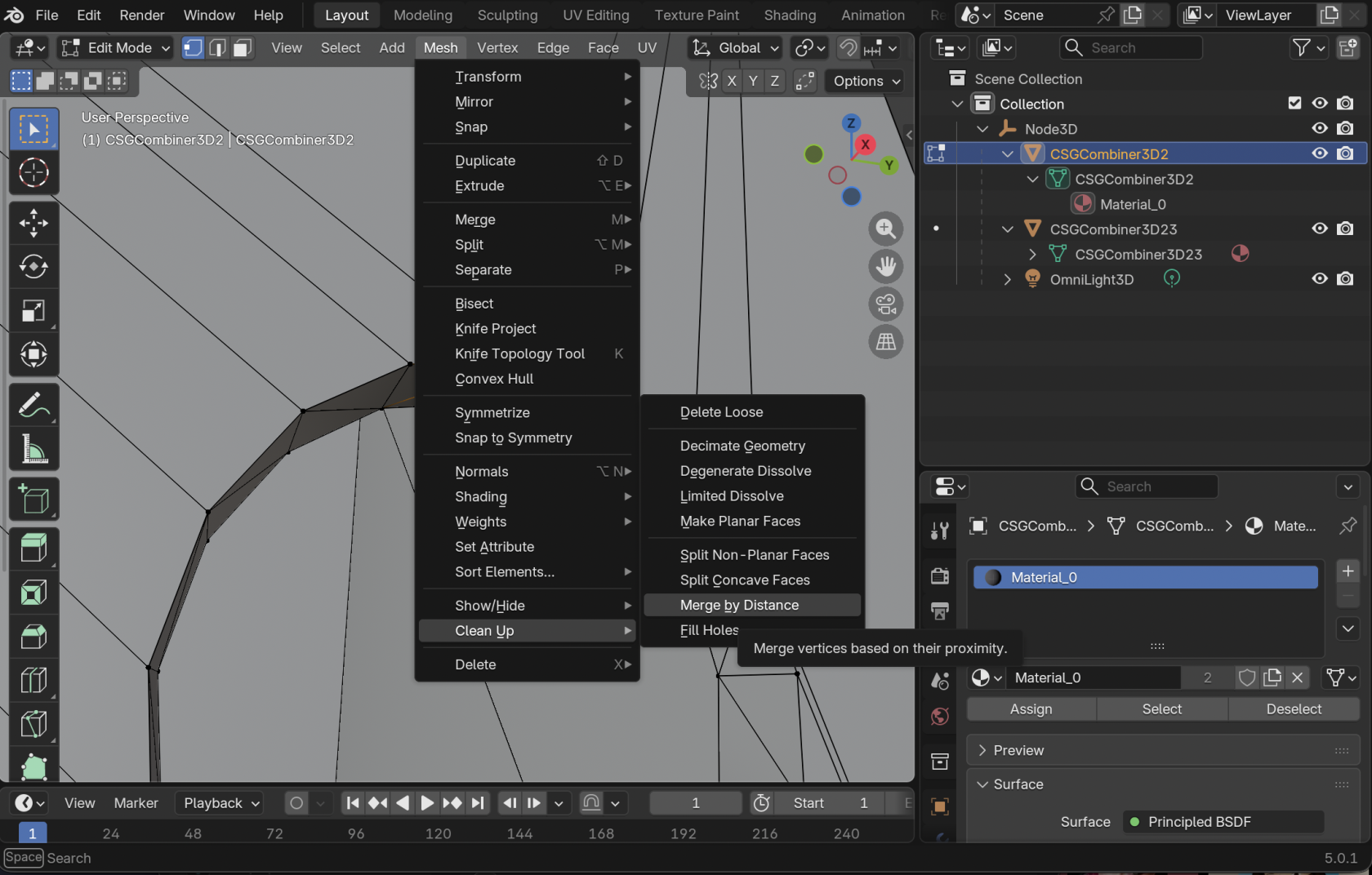
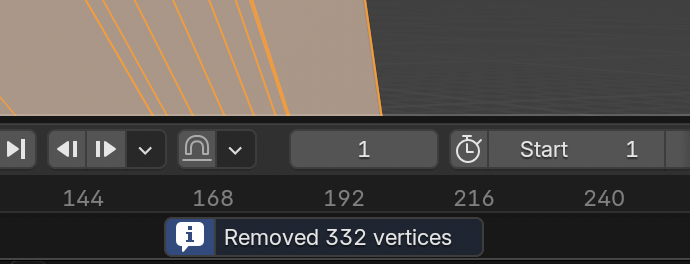
You should see a number of vertices removed at the bottom of the window.

**You will have to do this for each individual CSG mesh that was exported.**

[![Screenshot 2026-02-15 at 7.02.46 PM.png](https://docs.bugjam.dev/uploads/images/gallery/2026-02/scaled-1680-/screenshot-2026-02-15-at-7-02-46-pm.png)](https://docs.bugjam.dev/uploads/images/gallery/2026-02/screenshot-2026-02-15-at-7-02-46-pm.png)
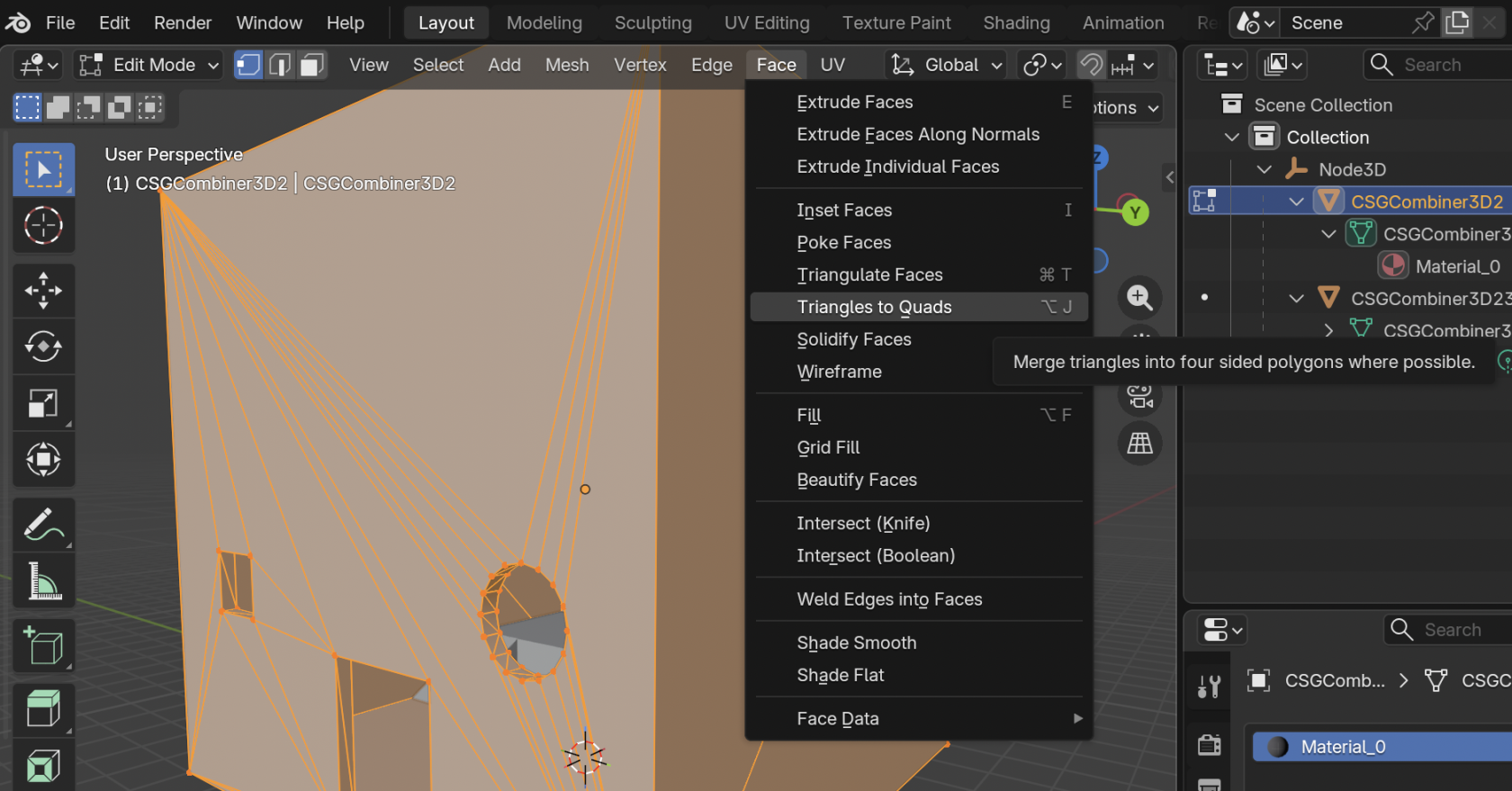
For a little bit of extra clean-up you can also go to **Face → Triangles to Quads**.

[![Screenshot 2026-02-15 at 7.04.51 PM.png](https://docs.bugjam.dev/uploads/images/gallery/2026-02/scaled-1680-/screenshot-2026-02-15-at-7-04-51-pm.png)](https://docs.bugjam.dev/uploads/images/gallery/2026-02/screenshot-2026-02-15-at-7-04-51-pm.png)
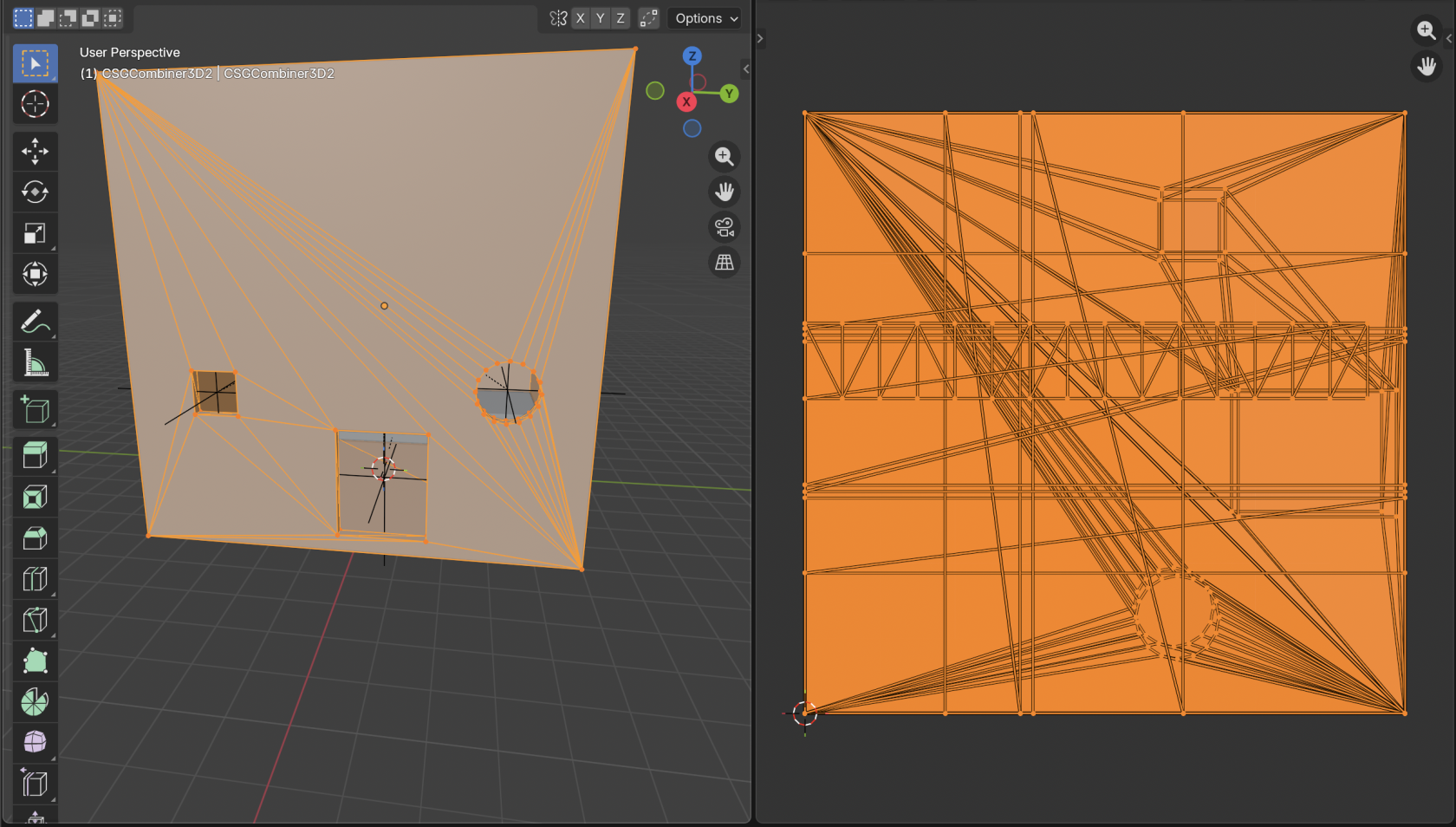
The topology here is not great, but you can at least get the overall shape of what you're working with. You can either edit this mesh directly, or build another mesh on top of it that has better topology.

The UVs here will also be a total mess - you may want to mark seams and unwrap it manually.

[![Screenshot 2026-02-15 at 7.12.48 PM.png](https://docs.bugjam.dev/uploads/images/gallery/2026-02/scaled-1680-/screenshot-2026-02-15-at-7-12-48-pm.png)](https://docs.bugjam.dev/uploads/images/gallery/2026-02/screenshot-2026-02-15-at-7-12-48-pm.png)
### Back into Godot

After making changes to the mesh, export it back to glTF using our art pipeline and then import that back into Godot.

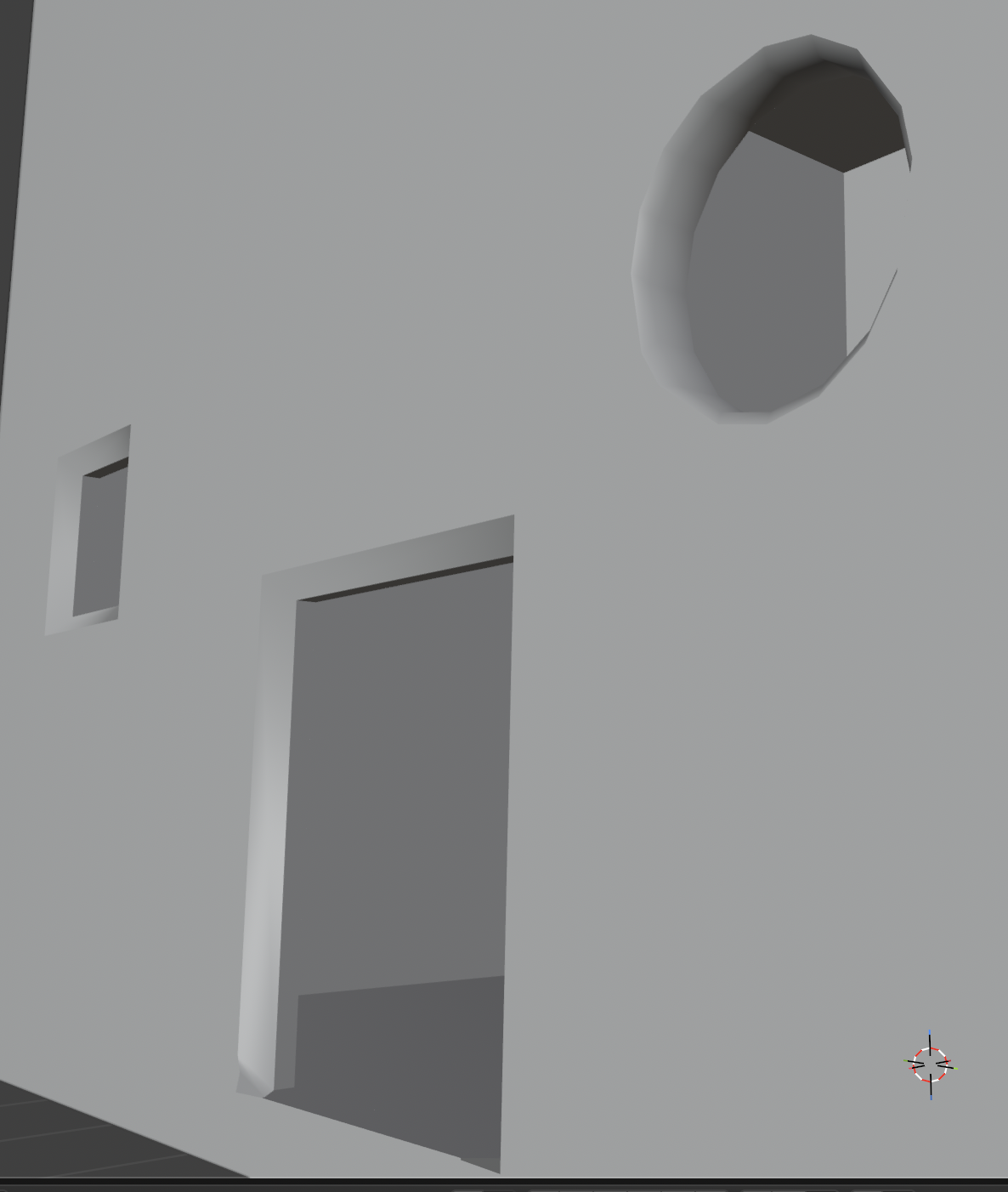
As an example, I added some super simple bevels around the windows here:

[![Screenshot 2026-02-15 at 7.16.23 PM.png](https://docs.bugjam.dev/uploads/images/gallery/2026-02/scaled-1680-/screenshot-2026-02-15-at-7-16-23-pm.png)](https://docs.bugjam.dev/uploads/images/gallery/2026-02/screenshot-2026-02-15-at-7-16-23-pm.png)
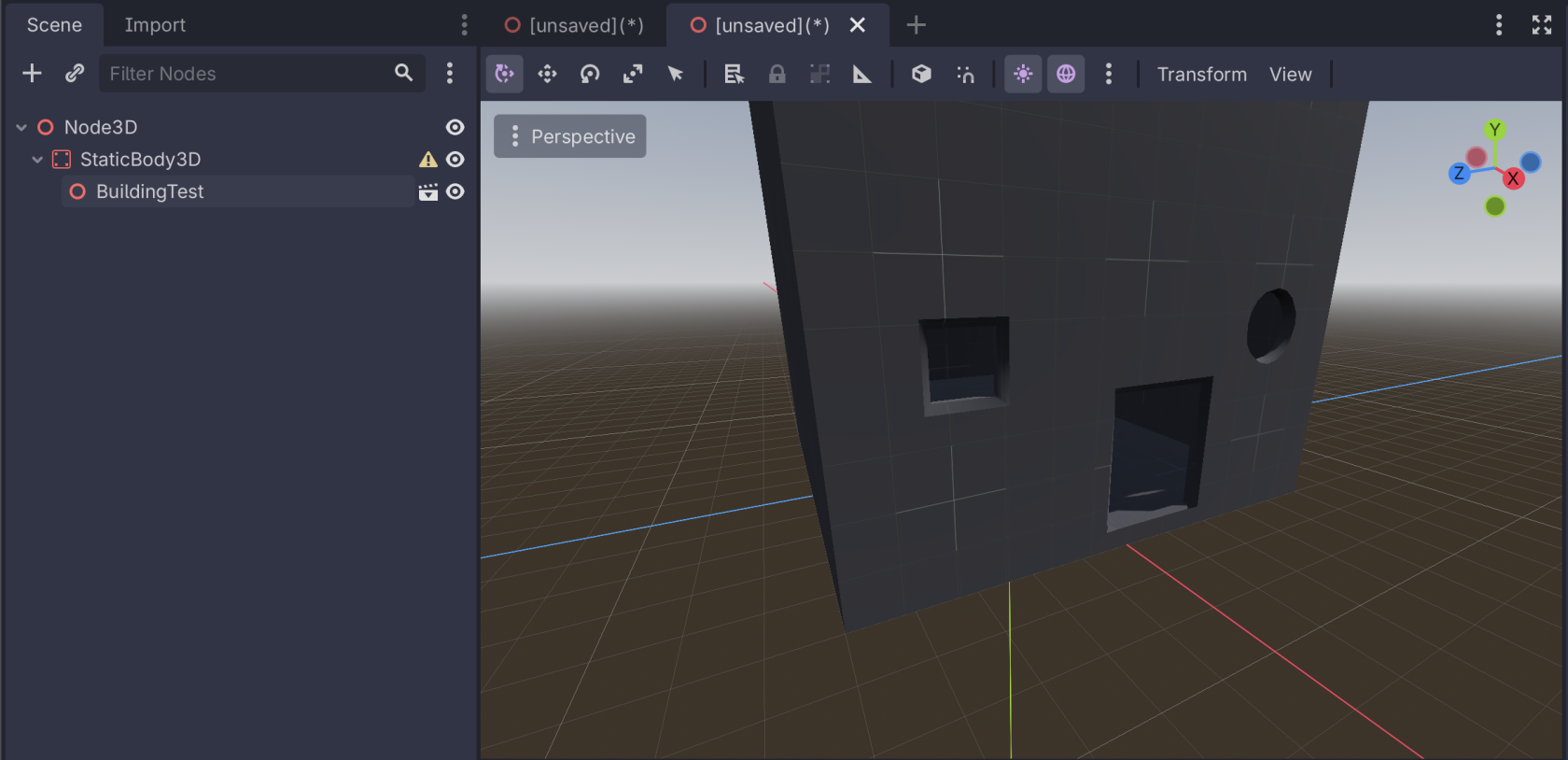
Create a new scene in Godot.

Add a `StaticBody3D` to the scene. Underneath that `StaticBody3D`, add your new mesh that was exported from Blender:

[![Screenshot 2026-02-15 at 7.18.19 PM.png](https://docs.bugjam.dev/uploads/images/gallery/2026-02/scaled-1680-/screenshot-2026-02-15-at-7-18-19-pm.png)](https://docs.bugjam.dev/uploads/images/gallery/2026-02/screenshot-2026-02-15-at-7-18-19-pm.png)
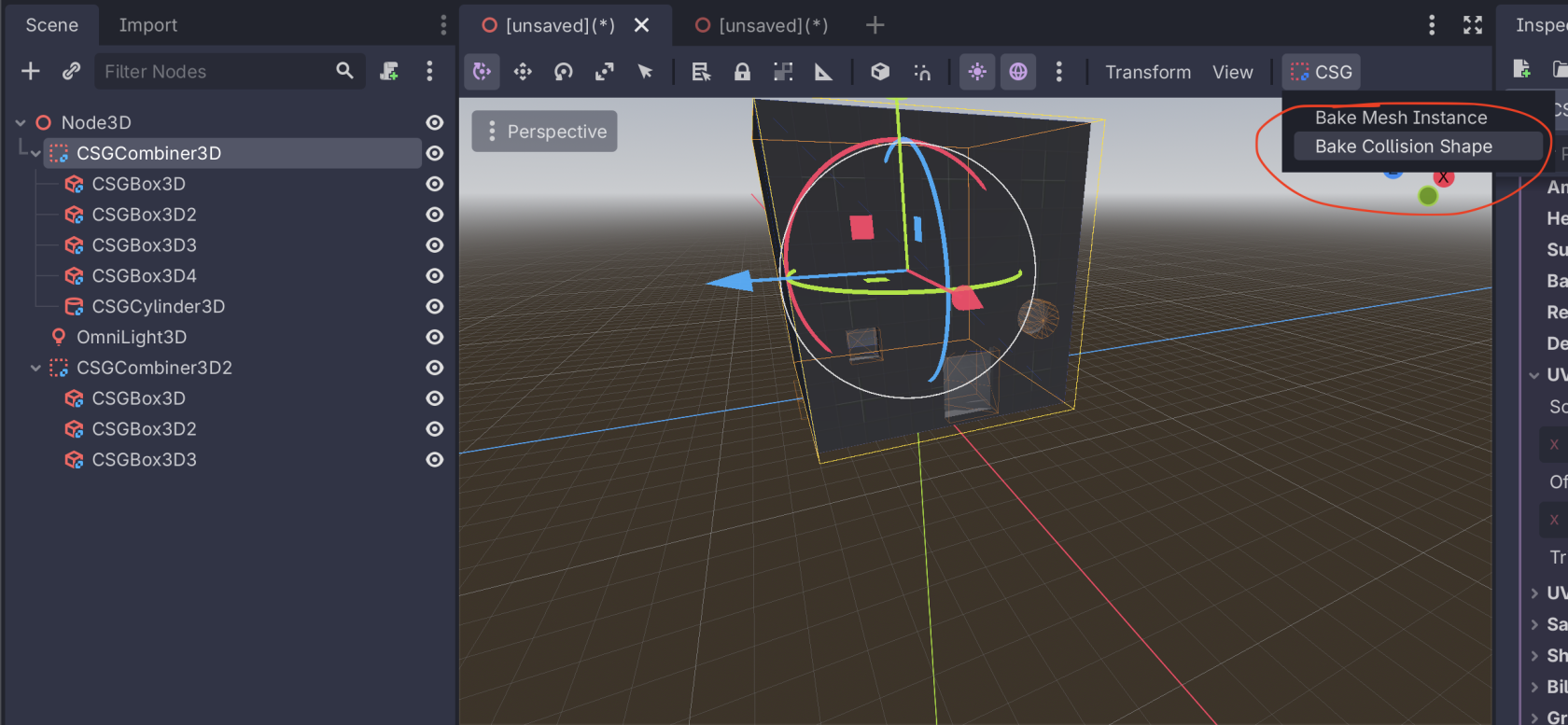
Back in the scene with the CSG nodes, select the root `CSGCombiner3D` and select **CSG → Bake Collision Shape**

[![Screenshot 2026-02-15 at 7.19.52 PM.png](https://docs.bugjam.dev/uploads/images/gallery/2026-02/scaled-1680-/screenshot-2026-02-15-at-7-19-52-pm.png)](https://docs.bugjam.dev/uploads/images/gallery/2026-02/screenshot-2026-02-15-at-7-19-52-pm.png)
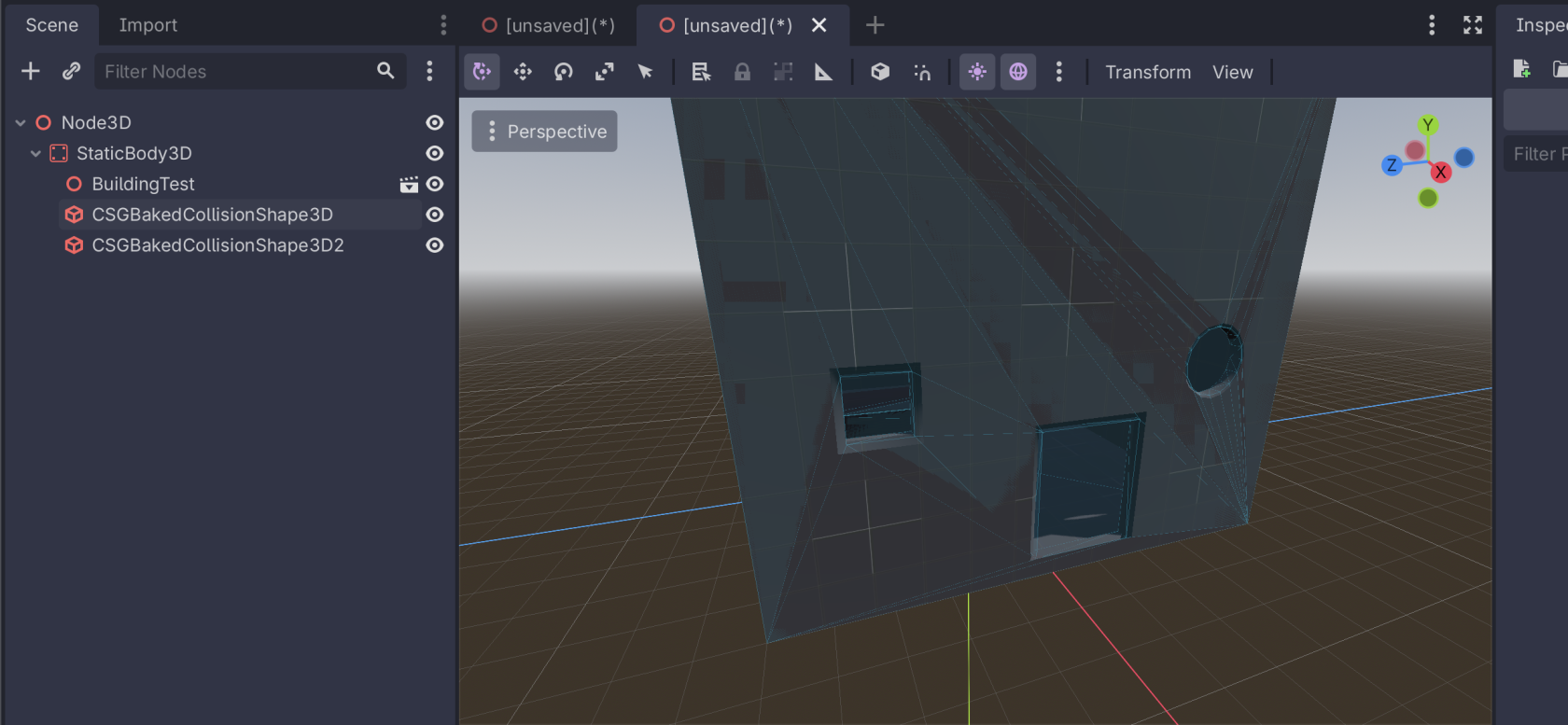
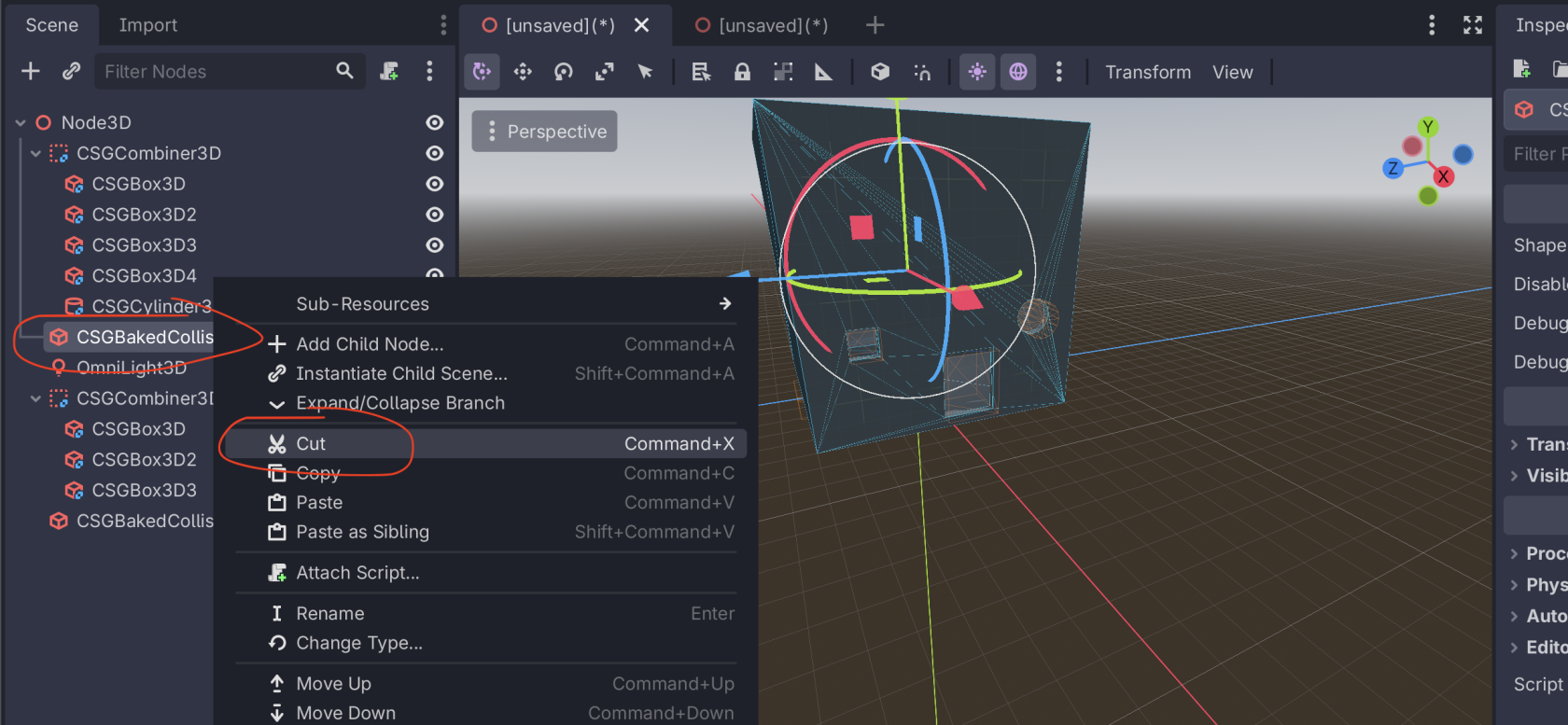
This will add a node called `CSGBakedCollisionShape3D` to the scene. Cut this node and then paste it in your new scene as a child of the `StaticBody3D`. If you have mulitple `CSGCombiner3D` in your scene, do this for each one.

[![Screenshot 2026-02-15 at 7.23.22 PM.png](https://docs.bugjam.dev/uploads/images/gallery/2026-02/scaled-1680-/screenshot-2026-02-15-at-7-23-22-pm.png)](https://docs.bugjam.dev/uploads/images/gallery/2026-02/screenshot-2026-02-15-at-7-23-22-pm.png)
[![Screenshot 2026-02-15 at 7.22.42 PM.png](https://docs.bugjam.dev/uploads/images/gallery/2026-02/scaled-1680-/screenshot-2026-02-15-at-7-22-42-pm.png)](https://docs.bugjam.dev/uploads/images/gallery/2026-02/screenshot-2026-02-15-at-7-22-42-pm.png)
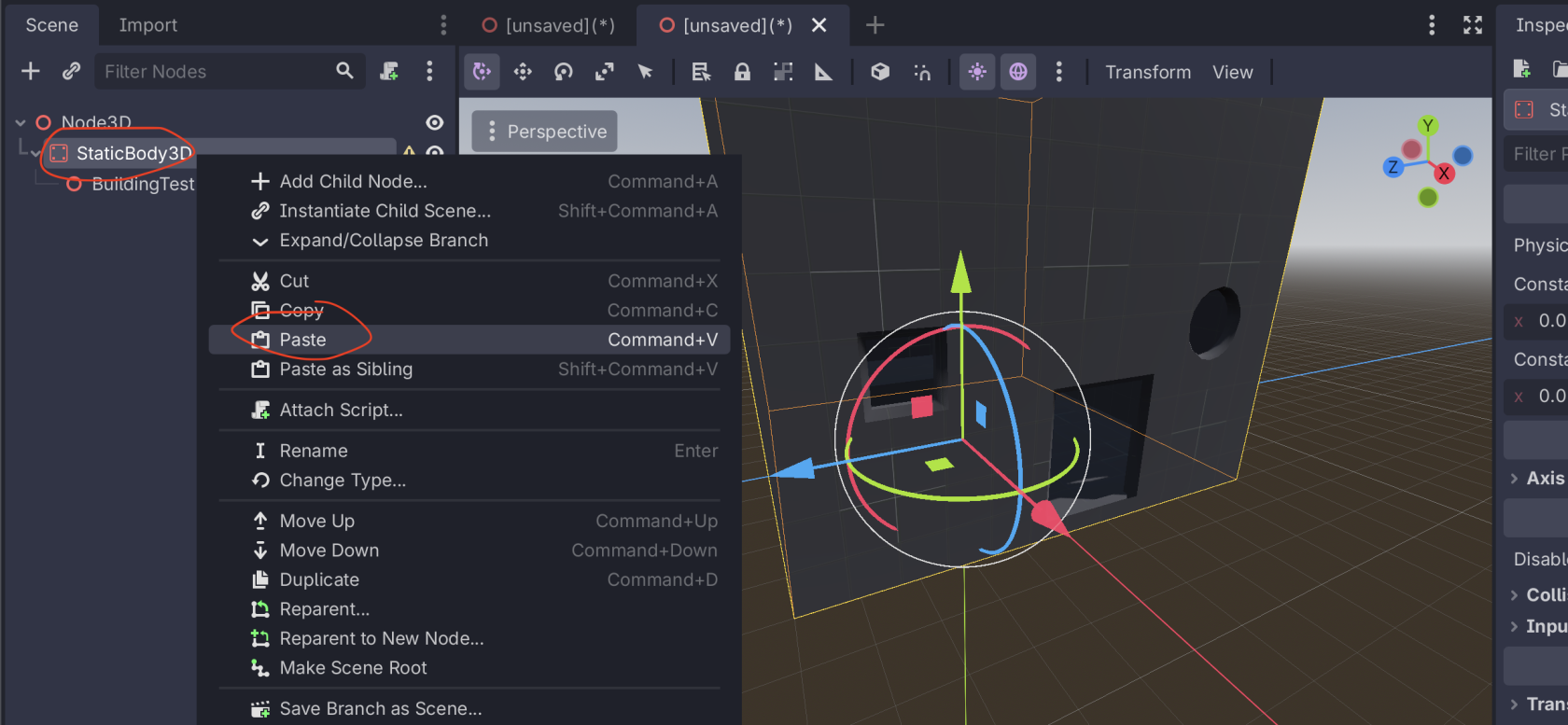
Then, your scene is ready to go! You have your mesh imported from the glTF file and the collision generated from the CSG nodes.

[![Screenshot 2026-02-15 at 7.24.03 PM.png](https://docs.bugjam.dev/uploads/images/gallery/2026-02/scaled-1680-/screenshot-2026-02-15-at-7-24-03-pm.png)](https://docs.bugjam.dev/uploads/images/gallery/2026-02/screenshot-2026-02-15-at-7-24-03-pm.png)